Releases: superGekFordJ/goaria-v3
Release list
v3.3.0-alpha.1

🚀 变更日志 / Changelog
v3.3.0-alpha.1 核心聚焦:全面提速从点击添加任务到真正开始下载的冷启动过程,消除一切多余等待,带来随点随下的即时畅快体验。
Core Focus: Slashing the latency from task creation to active download, eradicating redundant handshakes, and delivering a true zero-delay download startup.
⚡ 浏览器扩展体验与 Payload-First 极速启航 / Browser Extension & Payload-First
- 浏览器扩展秒级直连 (Payload-First Instant Stream):
- 对于浏览器扩展拦截或已知文件信息的下载场景,全面引入了现代下载器通用的 Payload-First 策略。添加任务后不再发起多余的入队探针(ProbeServer),直接请求首个有效数据分片,省去整整一次网络往返时延(RTT),实现点击即开始的顺滑无感体验。
- 签名与临时鉴权链接保护 (Presigned / One-Time URL Protection):
- 相比原版 Surge 引擎,彻底解决了带签名(如 S3/OSS 预签名 URL)、网盘临时鉴权或一次性访问链接在入队时因冗余探针被提前消耗下载额度、甚至导致链接失效的历史痛点,下载高敏感与限次资源更安全、更可靠。
- 首片安全验证与长度自愈 (Safe Shard Verification & Zero-Byte Self-Healing):
- 首片数据拉取与多线程断点续传能力验证合二为一,在首片数据成功落地后再平滑扇出多线程并发,彻底规避文件被意外清空或误降级的风险;针对部分 CDN 节点返回长度与头信息存在细微偏差的边缘情况,提供零写入自动校准与无感重试。
- Payload-First Instant Stream:
- For browser extension captures or downloads with known file metadata, we have fully embraced the industry-standard Payload-First strategy. The engine now bypasses redundant pre-download probe round-trips and directly requests the first actual data shard, delivering a seamless, instantaneous cold start the moment you click download.
- Presigned / One-Time URL Protection:
- Addressed a long-standing issue in upstream Surge engines: presigned links (e.g., S3/OSS pre-signed URLs), dynamic tokens, or single-use download links are no longer prematurely consumed or invalidated by redundant probes during task enqueueing, making protected downloads far more dependable.
- Safe Shard Verification & Zero-Byte Self-Healing:
- Data ingestion and multi-connection range capability checks are now seamlessly unified. The engine verifies server 206 capabilities during the initial data stream and only scales helper workers after the first chunk safely lands. Furthermore, a new zero-byte self-healing mechanism automatically re-calibrates edge CDN size discrepancies without disk penalty or task failure.
🌐 URL 手动添加与网络连接池 / URL Adding & Connection Pooling
- 专属持久化探测连接池 (Dedicated HeadProbe Connection Pool):
- 针对通过 URL 手动添加、拖拽或批量导入的任务,打造了进程级的专属 HTTP/1.1 长连接池与独立 TLS 会话缓存(TLS Session Cache)。连续或批量探测同域名目标时可直接复用温热连接,彻底免除反复握手与 TLS 协商的时间消耗,批量任务解析与智能分片探测响应如飞。
- 局域网 IPv6 智能识别 (Connected IPv6 GUA LAN Intelligence):
- 网络拓扑感知能力进一步增强,能精准识别本机已连接的 IPv6 全局单播(GUA)子网前缀(如
/64网段)。同前缀下的局域网邻居设备传输将被正确识别为 LAN 流量,不再受外网策略限制,充分释放内网极速带宽。
- 网络拓扑感知能力进一步增强,能精准识别本机已连接的 IPv6 全局单播(GUA)子网前缀(如
- Dedicated HeadProbe Connection Pool:
- For manually pasted URLs or batch-added tasks, we introduced a dedicated, process-lifetime HTTP/1.1 connection pool with an isolated TLS session cache. Probing and pre-flight checks against the same host now reuse warm TCP/TLS connections, drastically cutting handshake latencies and speeding up batch URL parsing and SmartThread scheduling.
- Connected IPv6 GUA LAN Intelligence:
- Enhanced network topology awareness to automatically detect connected IPv6 Global Unicast Address (GUA) subnet prefixes (e.g.,
/64). Transfers between local neighbor devices on the same subnet prefix are accurately classified as LAN traffic rather than WAN, removing rate constraints and unlocking full local network throughput.
- Enhanced network topology awareness to automatically detect connected IPv6 Global Unicast Address (GUA) subnet prefixes (e.g.,
📦 平台支持 / Platform Support
| 平台 / Platform | 格式 / Format |
|---|---|
| Windows (amd64) | .zip (portable exe) |
| Windows (arm64) | .zip (portable exe) |
| Linux (amd64) | .AppImage, .deb, .rpm, .pkg.tar.zst |
| macOS (apple silicon / intel) | .zip (containing .app bundle) |
⚠️ 注意 / Notice
-
状态 / Status: 预览版本 (Alpha Release) -
v3.3.0-alpha.1。此版本为无插件纯净版 (generic-no-pack)。 -
Status: Preview Release (Alpha Release) -
v3.3.0-alpha.1. This version is a generic-no-pack build.
Full Changelog: v3.2.4...v3.3.0-alpha.1
v3.2.4
🚀 变更日志 / Changelog
✨ 特性与体验升级 / Features & UX Enhancements
- 一键查看更新日志 (Release Notes Quick Access):
- 在检测到新版本时,可以直接点击版本号旁的快捷图标,一键在默认浏览器中跳转查阅对应版本的详细发布日志。
- 侧边栏双重光圈修复 (Sidebar Double-Ring Glitch Fix):
- 彻底消除了侧边栏导航选中项长期存在的“双重描边/双层重影光圈(Double Ring)”渲染缺陷,移除了多余的内层边框,使导航栏与深色及高透液态玻璃背景的融合更加干净利落、纯粹通透。
- Release Notes Quick Access:
- When a new version is detected, you can now directly click the quick access icon next to the release version tag to jump and view the detailed changelog in your default browser.
- Sidebar Double-Ring Glitch Fix:
- Completely eradicated the long-standing double-ring / double-outline rendering defect on active sidebar navigation items by stripping away redundant inner borders, delivering a much cleaner, sharper, and truly transparent blending with liquid glass materials.
🛠️ 稳定性与修复 / Stability & Fixes
- 组下载恢复列表流转优化 (Download Group Resume List Hold):
- 继 3.2.3 列表流转优化后,进一步完善了下载组(Download Group)批量恢复时的状态同步机制。在组恢复操作期间对成员状态变更进行延迟合并,一次性平滑前置刷新,彻底消除了组任务恢复时的列表重排与闪烁问题。
- Download Group Resume List Hold:
- Building upon the list flow optimizations in 3.2.3, further refined the state synchronization mechanism when resuming download groups. Member task moves are now held and assigned once in an orderly manner, completely resolving list reordering and flickering during group resumption.
📦 平台支持 / Platform Support
| 平台 / Platform | 格式 / Format |
|---|---|
| Windows (amd64) | .zip (portable exe) |
| Windows (arm64) | .zip (portable exe) |
| Linux (amd64) | .AppImage, .deb, .rpm, .pkg.tar.zst |
| macOS (apple silicon / intel) | .zip (containing .app bundle) |
🔮 预告 / Looking Ahead
- 本版本为 v3.2 的最后一个 Patch 补丁版本。
- 下一个版本将深度优化浏览器扩展与 Extractor 的交互体验,并进一步缩短从添加任务到任务实际开始下载的耗时。预计将于 1 至 2 周内 发布,敬请期待!
- This marks the final patch release for v3.2.
- Next Release Preview: Our upcoming version will focus on deeply optimizing the interaction between browser extensions and the Extractor runtime, while reducing the latency from task addition to active downloading. Expected to arrive in 1–2 weeks—stay tuned!
⚠️ 注意 / Notice
- 状态 / Status: 正式版 (Stable Release). 此版本为无插件纯净版 (generic-no-pack)。
- Status: Stable Release. This version is a generic-no-pack build.
Full Changelog: v3.2.3...v3.2.4
v3.2.3
🚀 变更日志 / Changelog
🧊 列表动画与交互优化 / List Animation & Interaction Optimization
- 任务进场动效直觉化 (Intuitive Task Entrance Animation):
- 优化了任务列表的 FLIP 动画与状态捕获逻辑。连续添加任务时,新卡片现在严格从顶部平滑下落就位,消除了此前末张任务在列表底部瞬间闪现后再前置、或顶槽产生多重叠影的异常现象。
- 批量恢复无缝衔接 (Seamless Batch Resume):
- 优化了批量恢复(Resume)任务时的状态流转与列表渲染机制。多条任务将保持原有的相对顺序一次性平滑前置,消除了原先每条事件逐个触发导致的列表快速乱闪与反复洗牌。
- 高频并发下的列表稳定性 (List Order Stability Under Concurrent Polls):
- 确立了前端本地列表顺序的权威性,统一了任务添加、后台状态推送与高频进度轮询之间的时序。彻底解决了在高速下载或密集操作场景下,顶部卡片可能出现的对撞、错位或重叠问题,使列表的每一次流动都自然流畅且符合直觉。
- Intuitive Task Entrance Animation:
- Refined FLIP animation and state capture logic in the task list. Consecutively added task cards now smoothly drop into place directly from the top, completely eliminating the previous glitch where cards briefly flashed at the bottom before moving up or created ghost overlays in the top slot.
- Seamless Batch Resume:
- Optimized state transitions and list rendering during batch resume operations. Multiple tasks are now smoothly prepended in their original relative order all at once, eradicating rapid list shuffling and flashing caused by per-task event triggers.
- List Order Stability Under Concurrent Polls:
- Established frontend local list order as authoritative, aligning the timings of task additions, background updates, and high-frequency polling. Completely resolved card collisions, misalignments, and overlaps under high-speed downloads or concurrent updates, making list transitions feel far more natural and intuitive.
📦 平台支持 / Platform Support
| 平台 / Platform | 格式 / Format |
|---|---|
| Windows (amd64) | .zip (portable exe) |
| Windows (arm64) | .zip (portable exe) |
| Linux (amd64) | .AppImage, .deb, .rpm, .pkg.tar.zst |
| macOS (apple silicon / intel) | .zip (containing .app bundle) |
⚠️ 注意 / Notice
- 状态 / Status: 正式版 (Stable Release). 此版本为无插件纯净版 (generic-no-pack)。
- Status: Stable Release. This version is a generic-no-pack build.
Full Changelog: v3.2.2...v3.2.3
v3.2.2
🚀 变更日志 / Changelog
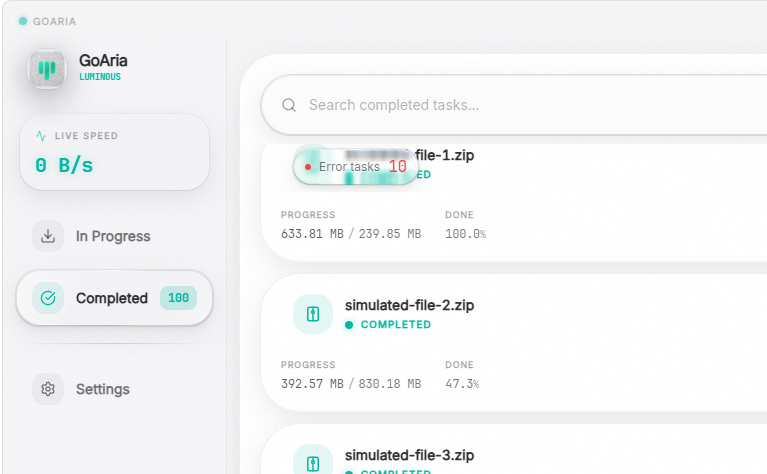
🔴 Error Filter Tag
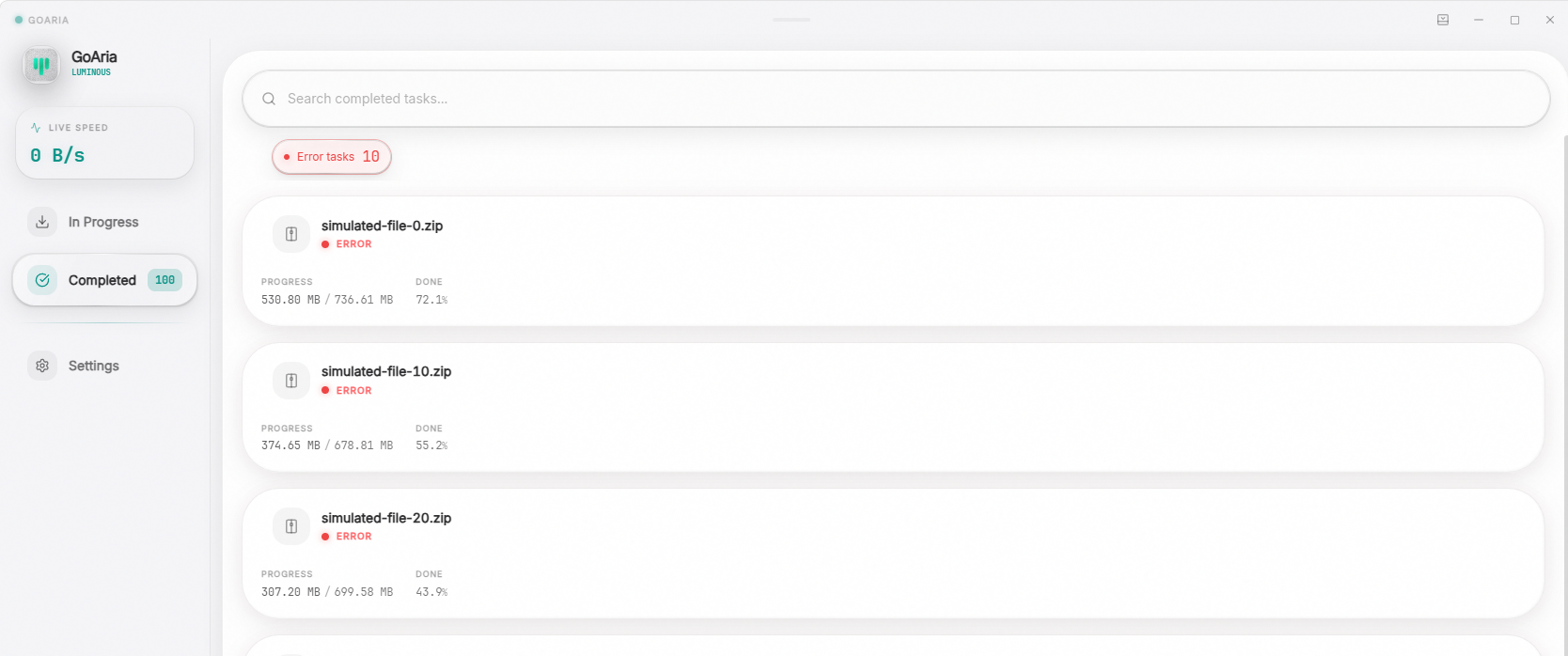
✨ Filter Activated
✨ 界面交互优化 / UI & UX Optimization
- 错误任务独立视图与管理 (Error Task Filter & Management):当检测到有失败的任务时,已完成页面中会自动显示一个专属的错误过滤标签。它同样无缝接入了高级材质的渲染管线。现在您可以清晰地将出错任务与正常完成的任务隔离开来,并便捷地对它们进行统一重试或批量清理操作。
- 辉光呼吸动画性能优化 (Glow Breathing Performance Optimization):根据我们在 v3.1.0 中所展示的实时 CSS 辉光呼吸(Glow Breathing)效果的持续运行反馈,我们发现它在暗色模式下(特别是任务卡片边缘)可能过于消耗系统性能。为了保障最佳的顺滑体验,我们对触发策略进行了动态调整:现在仅当材质滑块位于 Full 档且接近极致透明(>= 95)时,才会为您开启这套绚丽但极度吃性能的辉光动画。
- Error Task Filter & Management: When errored tasks are detected, an exclusive error filter tag will dynamically appear on the Completed page, which seamlessly integrates with the advanced material rendering pipeline. You can now easily isolate errored tasks from successfully completed ones, and conveniently perform batch retries or bulk deletions.
- Glow Breathing Performance Optimization: Based on the ongoing runtime telemetry of the real-time CSS Glow Breathing effect (prominently showcased in v3.1.0), we noticed it could be excessively performance-intensive in dark mode. To guarantee the smoothest experience, we've dynamically adjusted its trigger strategy: this gorgeous yet demanding glow animation will now only activate when your material slider is set to the Full tier and approaches ultimate transparency (>= 95).
🛠️ 核心引擎稳定性 / Core Engine Stability
- 状态持久化与并发修复 (State Persistence & Concurrency Fixes):加强了错误任务状态在后端的持久化机制,确保即使在意外情况下出错任务的状态也能被安全保留。同时,深度优化了底层的并发逻辑,大幅减少了在极端场景下可能出现的竞态问题,提升了引擎的运行稳定性。
- State Persistence & Concurrency Fixes: Strengthened the backend state persistence mechanism for errored tasks, ensuring their status is safely preserved even during unexpected situations. Concurrently, deeply optimized the underlying concurrency logic, significantly reducing potential race conditions in extreme scenarios and boosting engine runtime stability.
📦 平台支持 / Platform Support
| 平台 / Platform | 格式 / Format |
|---|---|
| Windows (amd64) | .zip (portable exe) |
| Windows (arm64) | .zip (portable exe) |
| Linux (amd64) | .AppImage, .deb, .rpm, .pkg.tar.zst |
| macOS (apple silicon / intel) | .zip (containing .app bundle) |
⚠️ 注意 / Notice
- 状态 / Status: 正式版 (Stable Release). 此版本为无插件纯净版 (generic-no-pack)。
- Status: Stable Release. This version is a generic-no-pack build.
Full Changelog: v3.2.1...v3.2.2
v3.2.1
🚀 变更日志 / Changelog
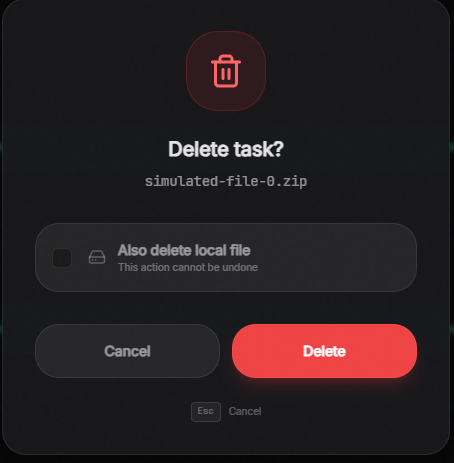 📉 Reduced |
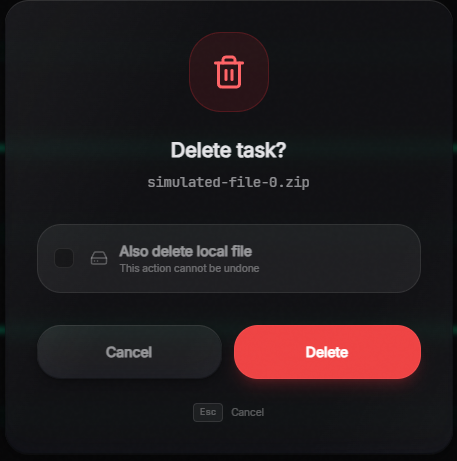 ⚖️ Balanced |
 🌟 Full |
✨ 细节优化 / Detail Optimization
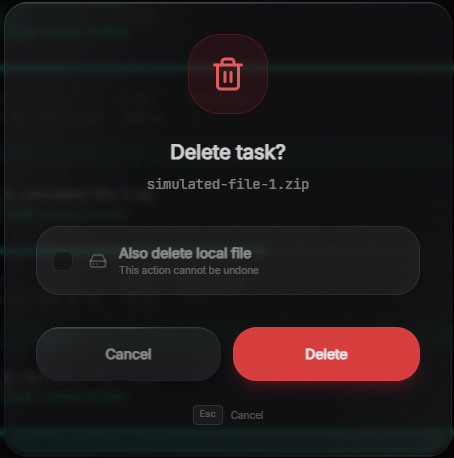
- 删除弹窗材质支持 (Delete Dialog Material Support):将删除弹窗也纳入了用户可调节的高级材质范围。现在删除弹窗也会受到全局平衡调节(Balanced Range)的影响;当材质调节至 Full 级别时,删除弹窗同样会呈现出液态玻璃(Liquid Glass)的折射效果。
- 动画过渡微调 (Transition Animation Tweak):对液态玻璃的过渡动画进行了细微优化,使得材质变化时更加顺滑自然。
- Delete Dialog Material Support: The delete dialog is now included in the user-adjustable advanced material range. It is now influenced by the global Balanced Range adjustment; when the material is set to the Full level, the delete dialog will also exhibit the Liquid Glass refraction effect.
- Transition Animation Tweak: Slightly optimized the transition animation for Liquid Glass, making material changes smoother and more natural.
🛠️ 重构 / Refactor
- 应用层架构精简 (App Layer Architecture Streamlining):深度重构了应用程序内部架构(App Facade 与 Extractor 包边界),解耦了不必要的扩展组件依赖。这进一步减小了纯净版的最终打包二进制体积,降低了运行时的开销。
- 说明: 今后在无特殊说明的情况下,所有公开发布的预编译安装包均默认是不带任何附加扩展的无插件纯净版 (generic-no-pack)。
- App Layer Architecture Streamlining: Deeply refactored the internal application architecture (App Facade and Extractor package boundaries), decoupling unnecessary extension dependencies. This further reduces the final binary size of the generic version and lowers runtime overhead.
- Note: Unless otherwise specified, all publicly released pre-compiled packages will default to the generic-no-pack version without any additional extensions.
📦 平台支持 / Platform Support
| 平台 / Platform | 格式 / Format |
|---|---|
| Windows (amd64) | .zip (portable exe) |
| Windows (arm64) | .zip (portable exe) |
| Linux (amd64) | .AppImage, .deb, .rpm, .pkg.tar.zst |
| macOS (apple silicon / intel) | .zip (containing .app bundle) |
⚠️ 注意 / Notice
- 状态 / Status: 正式版 (Stable Release). 此版本为无插件纯净版 (generic-no-pack)。
- Status: Stable Release. This version is a generic-no-pack build.
Full Changelog: v3.2.0...v3.2.1
v3.2.0
🚀 变更日志 / Changelog
🐛 修复 / Fix
- 输入框抖动修复 (Input Box Jitter Fix):修复了添加链接输入框有输入时,开始下载按钮的高度变化导致抖动的问题。
- Input Box Jitter Fix: Fixed an issue where typing in the add link input box caused the download button's height to change, resulting in UI jitter.
🛠️ 重构 / Refactor
- GoAria 应用层后端重构与读模型一致性 (Surge):大幅提升了任务列表和状态管理的可靠性。
- 解决了在错误状态下暂停/恢复会导致任务出现状态闪烁、残留幽灵任务或列表重复的问题。
- 现在对于错误的文件支持恢复下载 (resume),并在出错时保存之前的状态。即使因为环境问题导致多次中断,仍然能够顺利、完整地完成文件下载。
- 完善了已停止任务历史(终端历史)的读模型控制,确保数据展现更加连贯一致。
- GoAria Application Backend Refactoring & Read Model Coherence (Surge): Significantly improved the reliability of task lists and state management.
- Resolved issues where pausing/resuming an errored task would cause state flickering, ghost tasks, or duplicate list entries.
- Errored files can now be resumed, with their previous state safely preserved upon error. Even if environmental issues cause multiple interruptions, the download can still be completed smoothly and entirely.
- Refined the read model control for stopped task history (terminal history), ensuring a much more coherent data presentation.
✨ 特性 / Feature
- 磁盘空间超限保护 (Disk Space Limit Protection):新增了对于下载文件大小超出剩余磁盘空间的限制。现在添加任务时会有额外的预检拦截,防止超出空间大小。即使下载中途因为某些意外导致剩余空间超限,也会安全地保存已有的下载进度,并停留于任务列表中,方便您在清理磁盘空间后随时重试下载。
- Disk Space Limit Protection: Added a restriction to prevent downloading files that exceed the remaining disk space. There is now an extra pre-check interception when adding a task. Even if unexpected circumstances cause the space limit to be exceeded mid-download, the existing progress will be safely saved, and the task will remain in the list, allowing you to easily retry after freeing up disk space.
📦 平台支持 / Platform Support
| 平台 / Platform | 格式 / Format |
|---|---|
| Windows (amd64) | .zip (portable exe) |
| Windows (arm64) | .zip (portable exe) |
| Linux (amd64) | .AppImage, .deb, .rpm, .pkg.tar.zst |
| macOS (apple silicon / intel) | .zip (containing .app bundle) |
⚠️ 注意 / Notice
- 状态 / Status: 稳定版本 (Stable Version)
- 补充信息 / Additional Info: 详情请参考此前包含大量特性更新和重构的 v3.1.0 详细发布日志。
- Status: Stable Version
- Additional Info: For detailed update history regarding previous massive feature updates and refactoring, please refer to the v3.1.0 Release Notes.
Full Changelog: v3.1.2...v3.2.0
v3.1.2
🚀 变更日志 / Changelog
🩹 热修复 / Hotfix
- 403 软拦截优化 (Soft 403 Sticky Budget):在并发引擎底层引入了“耐心预算 (Sticky Budget)”机制。针对部分服务端将 403 错误作为“临时限流”手段的场景,引擎现在会赋予其额外的并发重试周期,一旦下载进度恢复,重试预算即自动重置。此修复有效解决了正常下载因服务端临时软拦截而被误判掐断的问题,大幅提升了引擎在复杂网络限流环境下的韧性。
- Soft 403 Sticky Budget: Introduced a "Sticky Budget" mechanism in the concurrent engine. To address scenarios where servers use 403 errors as a temporary throttle, the engine now grants extra retry cycles, which automatically reset upon any download progress. This resolves the issue of valid downloads being prematurely aborted due to soft throttling, significantly improving the engine's resilience in rate-limited environments.
📦 平台支持 / Platform Support
| 平台 / Platform | 格式 / Format |
|---|---|
| Windows (amd64) | .zip (portable exe) |
| Windows (arm64) | .zip (portable exe) |
| Linux (amd64) | .AppImage, .deb, .rpm, .pkg.tar.zst |
| macOS (apple silicon / intel) | .zip (containing .app bundle) |
⚠️ 注意 / Notice
- 状态 / Status: 稳定版本 (Stable Version)
- 补充信息 / Additional Info: 详情请参考此前包含大量特性更新和重构的 v3.1.0 详细发布日志。
- Status: Stable Version
- Additional Info: For detailed update history regarding previous massive feature updates and refactoring, please refer to the v3.1.0 Release Notes.
Full Changelog: v3.1.1...v3.1.2
v3.1.1
🚀 变更日志 / Changelog
✨ 特性更新 / Feature Updates
- 核心引擎优化 (Core Engine Optimization):同步了上游 Surge 引擎的改进 (SurgeDM/Surge#573)。现在,即使在遭遇极端网络情况(例如下载中途服务器突然拒绝访问并持续返回 401/403/404 等永久性 HTTP 错误)时,下载引擎也能正确识别并结束无效的下载,不再死循环无限重试,不仅大幅减少了网络资源浪费,也让调度器能更智能地应对这些罕见问题。
- 托盘模式内存优化 (Windows Tray Memory Optimization):我们观察到,当短时间内反复进行托盘化和唤醒窗口操作时,程序的空载内存可能会停留在 50MB 左右,这可能不是我们想要的。为了与“当前任务下载完释放资源”的行为对齐,我们专门对“托盘化”操作增加了主动的内存回收机制 (GC)。现在,反复托盘化/窗口化在 Windows 平台的预期空载内存为 35MB;点击托盘化一次之后触发了新增加的 GC,预期内存消耗仅为 17MB;单任务后台托盘模式的预期内存稳定在 20MB 左右,有效减少了大家长时间挂机时的资源浪费。
- Core Engine Optimization: Synchronized upstream Surge engine improvements (SurgeDM/Surge#573). Now, even when encountering extreme network conditions (such as the server suddenly denying access mid-download and continuously returning permanent HTTP errors like 401/403/404), the engine can correctly identify and terminate the invalid download instead of falling into an infinite retry loop. This significantly reduces network resource waste and allows the scheduler to handle these rare issues more intelligently.
- Windows Tray Memory Optimization: We noticed that frequently toggling the tray and recreating the window in a short time could leave the idle memory around 50MB, which isn't what we wanted. To align with the resource release behavior after a download completes, we've added an active memory reclaim (GC) mechanism specifically for the minimize-to-tray action. Currently, the expected idle memory for repeated tray/window toggles on Windows is 35MB; after clicking to minimize to the tray once, the newly added GC triggers and expected memory consumption drops to 17MB; the expected memory for single-task tray mode is stably around 20MB, effectively reducing system resource waste while you leave the app running in the background.
📦 平台支持 / Platform Support
| 平台 / Platform | 格式 / Format |
|---|---|
| Windows (amd64) | .zip (portable exe) |
| Windows (arm64) | .zip (portable exe) |
| Linux (amd64) | .AppImage, .deb, .rpm, .pkg.tar.zst |
| macOS (apple silicon / intel) | .zip (containing .app bundle) |
⚠️ 注意 / Notice
- 状态 / Status: 稳定版本 (Stable Version)
- 补充信息 / Additional Info: 详情请参考此前包含大量特性更新和重构的 v3.1.0 详细发布日志。
- Status: Stable Version
- Additional Info: For detailed update history regarding previous massive feature updates and refactoring, please refer to the v3.1.0 Release Notes.
Full Changelog: v3.1.0...v3.1.1
v3.1.0
在 3.1.0 版本中,我们带来了从底层到 UI 的全面进化。在这个版本里,我们深度同步了上游 Surge 引擎的跨代级事件驱动重构,同时完整保留并优化了 GoAria 独有的自适应调度与界面交互。
在这个版本中,您将体验到:
- 更精准实时的速率显示:高达 150ms 刷新频率的真实速率视觉反馈。
- 更聪明的并发过载保护:为同一网站并发下载引入域级排队账本,从源头避免被服务器拉黑。
- 更具个性的高质感界面:重写了列表 FLIP 动画,并引入全新的 0-100 视觉质量滑块,让您自由调校独属的丝滑渲染体验。
从更省心、更智能的底层线程调度,到更迅捷、更个性化的 UI 交互,3.1.0 致力于为您带来超越以往的纯粹下载体验。
In version 3.1.0, we bring a comprehensive evolution from the core engine to the UI. In this release, we deeply synchronized the generational event-driven refactoring from the upstream Surge engine, while fully retaining and optimizing GoAria's unique adaptive scheduling and interfaces.
In this version, you will experience:
- More Accurate Real-time Speeds: True speed feedback updated at a blistering 150ms interval.
- Smarter Overload Protection: A new domain-level capacity ledger for concurrent downloads from the same site, preventing server IP bans at the source.
- Highly Personalized Premium UI: Rewritten list FLIP animations and a brand-new 0-100 visual quality slider, allowing you to freely tune your unique, silky-smooth rendering experience.
From more effortless and intelligent underlying thread scheduling to swifter and highly personalized UI interactions, 3.1.0 is dedicated to delivering an unprecedented, pure downloading experience.
📖 阅读完整中文更新日志
🎨 渲染引擎革命与性能优化
- 全新视觉质量滑块:告别了简单的“全开/全关”设置。我们引入了全新的 0-100 视觉质量滑块,并加入了全新的“均衡 (Balanced)”默认档位。
- 动态性能优化:我们重构了核心渲染管线。由于 Chromium 内核对实时 CSS 辉光呼吸(Glow Breathing)的渲染优化存在历史局限,全效模式下的性能消耗可能偏高。全新的“均衡”档位不仅保留了绝佳的静态玻璃质感与柔和流光,更大幅提升了运行时的流畅度。
- 无缝无极调节:滑块支持 0-100 平滑过渡。为了将手感打磨到极致,我们引入了分段二次贝塞尔曲线。这项技术让滑块的调节告别了生硬的线性变化,不仅赋予了拖拽时极度直观的顺滑感,更极大地丰富了单个档位内部(从低到高)的视觉跨度。这意味着,即使在同一个“均衡”档位下,您也能调校出从厚重实体到高级通透的多种细腻质感,轻松找到最完美契合您审美的那个点。此外,我们剥离了拖拽时的本地存储写入(Storage I/O),确保实时预览全界面效果时零卡顿!
🖼️ 视觉档位对比
💡 提示:特效不仅仅局限于任务卡片和玻璃框,整个界面的其他元素也会随之变化。推荐在设置页面亲自拖动滑块体验!
✨ 1. 任务边缘辉光
任务卡片的辉光与动态能量条。以下依次展示了在不同主档位下的边缘发光细节与渲染效果:
🍃 精简

⚖️ 均衡 (默认档位)

🌟 全效

🎛️ 2. 无极滑块曲线过渡展示
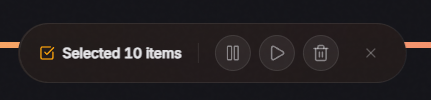
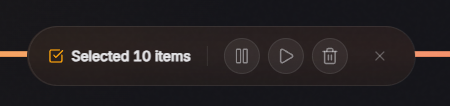
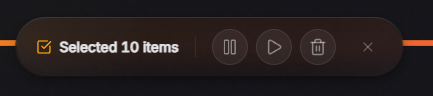
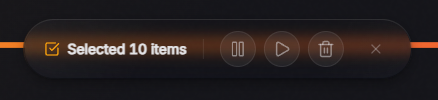
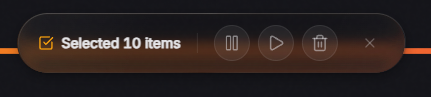
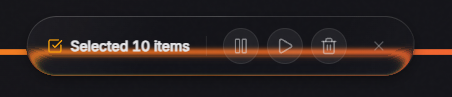
得益于上述的“分段二次贝塞尔曲线”映射,滑块在每一个大档位区间内拖拽时,面板的玻璃材质都会发生细腻的变化。以下展示了滑块在各区间内从“较低值 (Low)”到“较高值 (High)”的真实演变:
🍃 精简区间 (0 ➔ 30)
快速拉开视觉差距,从厚重实体向毛玻璃过渡
 |
 |
⚖️ 均衡区间 (31 ➔ 70)
手感最为平滑,提供极高宽容度的细腻微调
 |
 |
🌟 全效区间 (71 ➔ 100)
跨度再次放大,向极尽通透与华丽延展
 |
 |
🚀 网络连接与调度优化
- 1-RTT TLS 会话恢复:现在底层引擎跨传输池共享会话缓存。在空闲连接重建、任务暂停/恢复等场景下,握手延迟被大幅压缩,显著降低了安全连接的建立开销。
- 轻量级连接预热:在引擎决定增加下载线程时,如果发现没有备用连接,现在会用极低的代价优先将网络连接“捂热”。这个微小的改进能让下载在加速阶段更加顺滑,有效避免了由于冷连接握手导致的短暂停顿或降速,让您更快地达到满速状态。
- 宏观带宽统计算法重构:彻底重构了底层的可用带宽聚合逻辑。该变更严格隔离了底层调度账本与前端 UI 的平滑展示,修复了由于上游引擎瞬断引发的剩余带宽超发分配问题。
- 高频实时速率渲染:得益于同步上游引擎的深度重构,现在 UI 界面的实时速度展示更加精准。引擎能够以 150ms 的极高频率向前端持续推送更新,为您带来近乎毫无延迟的真实速率视觉反馈。
🧊 列表动画渲染重构
- 丝滑的列表 FLIP 动画:得益于底层虚拟滚动组件的升级,我们获得了更大的自定义动画空间,并成功重写、引入了全新的 FLIP 动画引擎。过去在任务状态变动、排序刷新时毫无过渡效果的生硬切换已成为历史。现在,您能直观地看到每一个任务在列表中的顺滑流转与位移!
🚀 同源并发过载保护
- 域级调度账本:彻底解决了在同一网站(域名)下高速连加多个任务时,因瞬间建立大量连接而触发服务端严苛限速的难题。现在,智能引擎为每个独立域名启用了严格的余量排队账本。后续任务将以极低的连接数平滑起步,并在有带宽余量时再做探索,从源头上避免了“拥堵踩踏”。
- 同源带宽智能交接:重构了任务完成时的带宽释放与交接逻辑。现在,当同域名的任务下载完成时,其释放的带宽将以“有界倍增”的方式,顺滑、无缝地交接给其他处于等待或慢速状态的任务。
🧠 弱网环境下的自适应优化
- 精准探底与天花板侦测:针对晚高峰或极差 CDN 节点的环境进行了深度调优。新机制能更敏锐地侦测到“单线程拉起无效果”的速度天花板,防止在死局中盲目增加无用线程,显著降低了系统的无效资源消耗。
- 探测底线修复:修正了 BBR 自适应引擎在短暂带宽超卖后,由于探测底限计算错误而无法正常缩容的核心缺陷。现在,当网络拥堵时,引擎能毫无阻碍地回调至安全底线并重新结算。
⚙️ 核心机制修复与更新
- 底层引擎全面换代:全面引入了上游最新的 Surge 引擎事件驱动重构。通过对底层网络调度的跨代级升级,将核心模块进一步解耦,使得引擎在处理海量并发任务时更加稳定、高效。
- 终端事件总线重构:重写了事件总线(EventBus),精简了引擎空闲时的资源回收机制,进一步降低了待机时的性能消耗。
- 限速(HTTP 429)退避优化:针对下载遇到限速的情况,优化了底层的智能退避与重试机制,更平滑地对待服务器。
- 暂停与重试进度指针显示修复:深度同步了上游 Surge 引擎对于特定重试(Backoff)或暂停场景下进度条指针不准确的问题。由于 GoAria 拥有独立的 Verified Progress 机制,实际下载完整性完全不受影响,本次合并主要解决了纯 UI 层面可能出现的指针跳变。
- 峰值速度与指纹记录修复:修正了长时下载中峰值速度 (PeakSpeed) 采样可能被异常拉高的“撕裂”缺陷,确保网络环境指纹 (PeakEnvKey) 始终与实际会话状态保持严格一致。
- 限速识别修复:修复了一个会偶尔将“无限速任务”误认为“被服务器限速”的后台缺陷。现在,自适应引擎在面对无限速任务时,能够毫无顾忌地火力全开。
- 拓展更新与依赖升级:发布官方浏览器拓展包
0.1.1版本;更新pnpm至 11.17.0 并全面同步前端依赖库至最新。
📖 Read Full English Release Notes
🎨 Rendering Engine & Performance
- Effects Quality Slider: Say goodbye to the simple "on/off" toggle. We've introduced a new 0-100 visual quality slider featuring a brand-new "Balanced" default tier.
- Dynamic Performance Optimization: We've refactored the core rendering pipeline. Because browser engines (Chromium) have legacy limitations in optimizing real-time CSS glow breathing, the Full tier can be performance-intensive. The new "Balanced" tier retains stunning static glass textures and soft glow while significantly improving runtime smoothness.
- Seamless Stepless Adjustment: The slider supports a 0-100 smooth transition. To perfect the tactile feel, we introduced Piecewise Quadratic Bezier Curves. This algorithm eliminates rigid linear changes, bringing an intuitively smooth feeling to your adjustments. More importantly, it dramatically expands the visual range from low to high within a single tier. This means that even within the "Balanced" tier, you can fine-tune through a rich variety of textures—from frosted to highly transparent—to find your absolute sweet spot. We also decoupled live previews from storage I/O, ensuring absolutely silky-smooth, stutter-free dragging!
🖼️ Visual Tier Comparison
💡 Tip: Visual effects apply to the entire UI, not just task cards and glass panels. We recommend dragging the slider in settings to experience it yourself!
✨ 1. Task Glow
Glow and dynamic energy bars on task cards. Below shows the edge glow details and rendering effects under the main tiers:
🍃 Reduced
⚖️ Balanced (Default)
🌟 Full
🎛️ 2. Slider Curve Transitions
Thanks to the "Piecewise Quadratic Bezier Curves" mapping, dragging the slider within each tier subtly evolves the glass materials. Below shows the organic evolution from "Low" to "High" values within each range:
🍃 Reduced Range (0 ➔ 30)
Rapid transition from solid to frosted glass
|
|
⚖️ Balanced Range (31 ➔ 70)
Smoothest feel, providing high-tolerance fine-tuning
|
|
🌟 Full Range (71 ➔ 100)
Expanded span, extending into ultimate transparency and elegance
|
|
🚀 Network & Scheduling Optimizations
- 1-RTT TLS Session Resumption: The engine now shares a global
ClientSessionCacheacross transport pools. During idle connection rebuilds or pause/resume cycles, TLS handshake latency is reduced to 1-RTT, significantly lowering secure connection overhead. - Lightweight Prewarm: When the engine decides to scale up download threads, it now intelligently "warms up" new network connections first....
v3.1.0-rc.1
✨ 核心亮点 / Core Highlights
🎨 渲染引擎革命与性能优化 / Rendering Engine & Performance
- 全新视觉质量滑块 (Effects Quality Slider):告别了简单的“全开/全关”设置。我们引入了全新的 0-100 视觉质量滑块,并加入了全新的“均衡 (Balanced)”默认档位。
- 动态性能优化 (Dynamic Performance Optimization):我们重构了核心渲染管线。由于 Chromium 内核对实时 CSS 辉光呼吸(Glow Breathing)的渲染优化存在历史局限,全效模式下的性能消耗可能偏高。全新的“均衡”档位不仅保留了绝佳的静态玻璃质感与柔和流光,更大幅提升了运行时的流畅度。
- 无缝无极调节:滑块支持 0-100 平滑过渡,从左到右同时控制背景的模糊度(Blur)与透明度(Opacity)。最左侧为最高模糊度、最低透明度;最右侧为最低模糊度、最高透明度。您可以随意拖动滑块,实时预览全局界面的变化,选择最适合自己感官的档位!
- Effects Quality Slider: Say goodbye to the simple "on/off" toggle. We've introduced a new 0-100 visual quality slider featuring a brand-new "Balanced" default tier.
- Dynamic Performance Optimization: We've refactored the core rendering pipeline. Because browser engines (Chromium) have legacy limitations in optimizing real-time CSS glow breathing, the Full tier can be performance-intensive. The new "Balanced" tier retains stunning static glass textures and soft glow while significantly improving runtime smoothness.
- Seamless Adjustment: The slider supports a 0-100 smooth transition, controlling both background blur and opacity simultaneously. Moving from left to right decreases blur while increasing opacity. Drag the slider to preview UI changes in real-time and find your perfect balance!
🖼️ 视觉档位对比 / Visual Tier Comparison
提示:特效不仅仅局限于任务卡片和玻璃框,整个界面的其他元素也会随之变化。推荐在设置页面亲自拖动滑块体验!
Tip: Visual effects apply to the entire UI, not just task cards and glass panels. We recommend dragging the slider in settings to experience it yourself!
✨ 1. 任务边缘辉光 (Task Glow)
任务卡片的辉光与动态能量条。以下依次展示了在不同档位下的边缘发光细节与渲染效果。
Glow and dynamic energy bars on task cards. Below shows the edge glow details and rendering effects under different tiers.
🔋 精简 (Reduced)
⚖️ 均衡 (Balanced - Default)
🌟 全效 (Full)
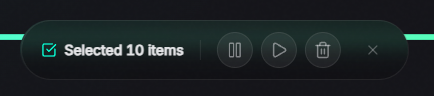
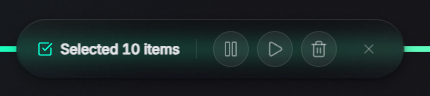
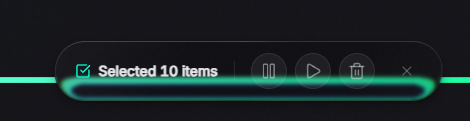
🔍 2. 玻璃折射与整体特征 (Glass Refraction & Traits)
| 🔋 精简 (Reduced) | ⚖️ 均衡 (Balanced - Default) | 🌟 全效 (Full) |
|---|---|---|
 |
 |
 |
| 极致精简与关注性能 专注于下载本身 Ultimate minimalism & performance. Focuses solely on downloading. |
保留静态玻璃与柔和辉光 极佳的性能与视觉平衡 Retains static glass & soft glow. Great balance of performance & visuals. |
开启实时液态折射与辉光呼吸 最惊艳的视觉享受 Enables real-time liquid refraction & glow breathing. The most stunning visual experience. |
⚙️ 核心状态机会计修复 / Core State Machine Accounting
- 暂停与重试进度指针显示修复 (Pause & Retry Pointer Fix):深度同步了上游 Surge 引擎对于特定重试(Backoff)或暂停场景下进度条指针不准确的问题。注: 由于 GoAria 拥有自己独立的 Verified Progress 机制,3.0.0-rc.5 版本以后的用户在实际下载完整性上完全不受此上游缺陷影响。本次合并主要解决了纯 UI 层面可能出现的指针跳变小问题,让进度显示更加精准丝滑。
- Pause & Retry Pointer Fix: Deeply synchronized fixes from the upstream Surge engine regarding inaccurate progress bar pointers during specific retry (backoff) or pause scenarios. Note: Because GoAria has its own independent Verified Progress mechanism, users on version 3.0.0-rc.5 and later were completely unaffected functionally. This merge resolves minor UI-level pointer glitches to make progress display perfectly accurate.
📦 平台支持 / Platform Support
| 平台 / Platform | 格式 / Format |
|---|---|
| Windows (amd64) | .zip (portable exe) |
| Windows (arm64) | .zip (portable exe) |
| Linux (amd64) | .AppImage, .deb, .rpm, .pkg.tar.zst |
| macOS (apple silicon / intel) | .zip (containing .app bundle) |
⚠️ 注意 / Notice
- 状态 / Status: 发布候选版本 1 (Release Candidate 1). 此版本为无插件纯净版 (generic-no-pack)。
- Status: Release Candidate 1. This is a generic-no-pack release.