


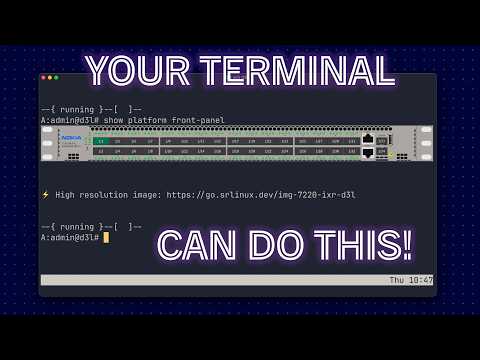
This repository provides an SR Linux CLI plugin that shows a terminal-rendered image of the device front panel using terminal image protocols (kitty graphics protocol and iTerm inline images / OSC 1337) with port states overlay.

Click on the preview image to view a demo on YouTube.
Leave your comments on LinkedIn.
If you want to see how the plugin works without having to build it yourself, you can try it out in a GitHub Codespace with the "Open in Codespaces" button at the top of this README.
To run the plugin locally with the provided Containerlab topology, ensure you have Go 1.24+ installed and run the below command to build the binary and deploy the lab:
./run.sh deploy-allThe lab contains two SR Linux nodes (7220 IXR-D2L and 7220 IXR-D3L) with different front panels, so you can try out the plugin on both by running show platform front-panel on each node.
SSH into one of the nodes and run show platform front-panel to see the front panel image rendered directly in your terminal. The plugin will auto-detect your terminal capabilities and use the best available image protocol.
On top of the frontpanel image, you will see the port labels (e.g. 1/1, 1/2, ...) and color-coded port states:
- green for admin up AND oper up
- orange for admin up AND oper down
- no color for admin down
Port states/color are based on the actual interface state in SR Linux.
Added platforms are listed below. Request new platforms by opening an issue.
| Platform |
|---|
| 7215 IXS-A1 |
| 7220 IXR-D1 |
| 7220 IXR-D2 |
| 7220 IXR-D2L |
| 7220 IXR-D3 |
| 7220 IXR-D3L |
| 7220 IXR-D5 |
| 7730 SXR-1x-44S |
Depending on your terminal capabilities, the plugin will use either kitty graphics protocol or iTerm inline images (OSC 1337) to render the front panel image. If your terminal supports neither protocol, the plugin will print a URL to a high-resolution image of the front panel instead.
| Terminal | Graphics protocol | Notes |
|---|---|---|
| Kitty | Kitty graphics protocol | |
| iTerm2 | iTerm inline images (OSC 1337) | |
| VS Code Integrated Terminal | Kitty graphics protocol (>=1.110.1) and iTerm images (<1.110.1) | Requires "terminal.integrated.enableImages": true setting. On MacOS with narrow terminal windows images may appear blurry. |
| Ghostty | Kitty graphics protocol | |
| WezTerm | Kitty graphics protocol |
Terminals with no image support: MacOS Terminal, PuTTY.
Note: VS Code Integrated Terminal started supporting kitty graphics protocol in version 1.110, prior to that it supported iTerm inline images when "terminal.integrated.enableImages" setting is enabled.
