Qonversion - In-app subscription monetization: implement subscriptions and grow your app’s revenue with A/B experiments
- In-app subscription management SDK
- No-Code Builder SDK for creating paywalls and onboarding in just a couple of lines of code
- API and webhooks to make your subscription data available where you need it
- Seamless Stripe integration to enable cross-platform access management
- Subscribers CRM with user-level transactions
- Instant access to real-time subscription analytics
- Built-in A/B experiments for subscription business model
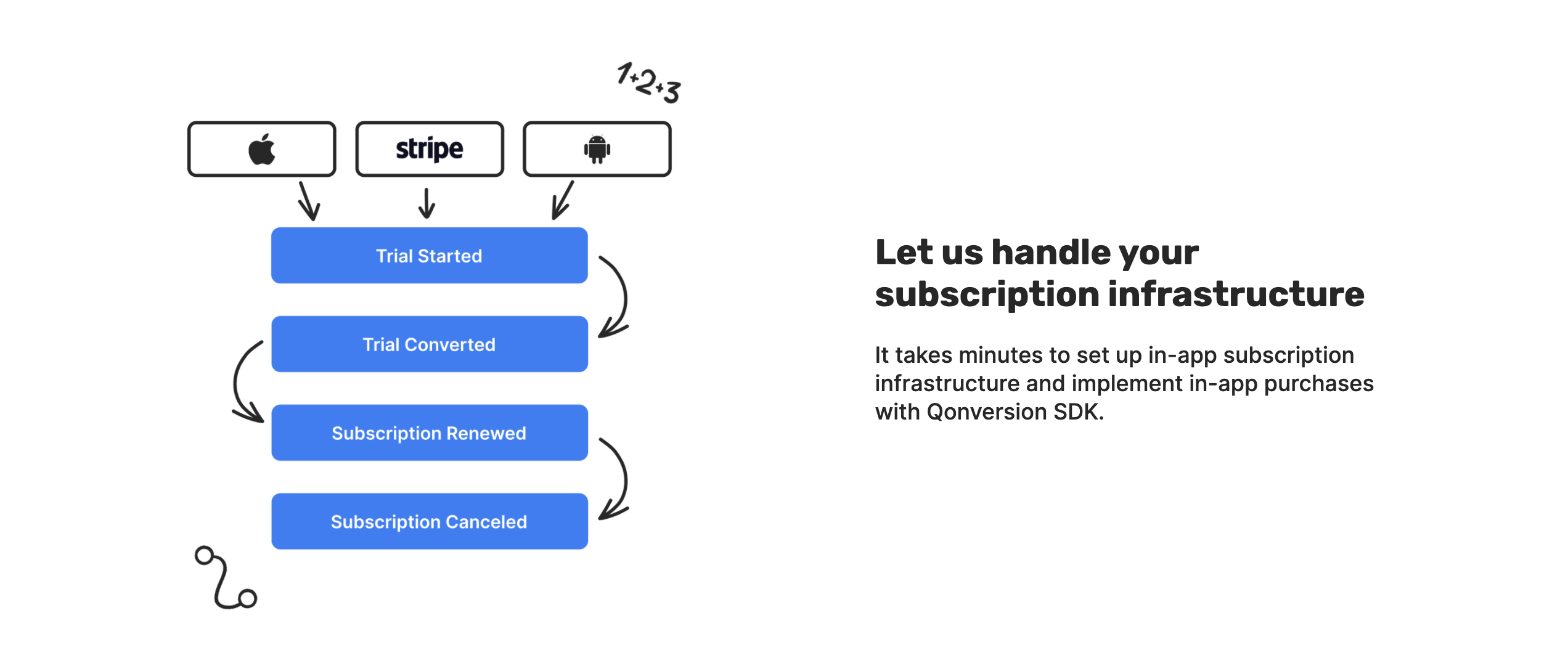






- Qonversion SDK provides three simple methods to manage subscriptions:
- Get in-app product details
- Make purchases
- Check subscription status to manage premium access
- Qonversion communicates with Apple or Google platforms both through SDK and server-side to process native in-app payments and keep subscription statuses up to date.
- You can use Qonversion webhooks and API in addition to SDK to get user-level data where you need it.
See the quick start guide documentation.
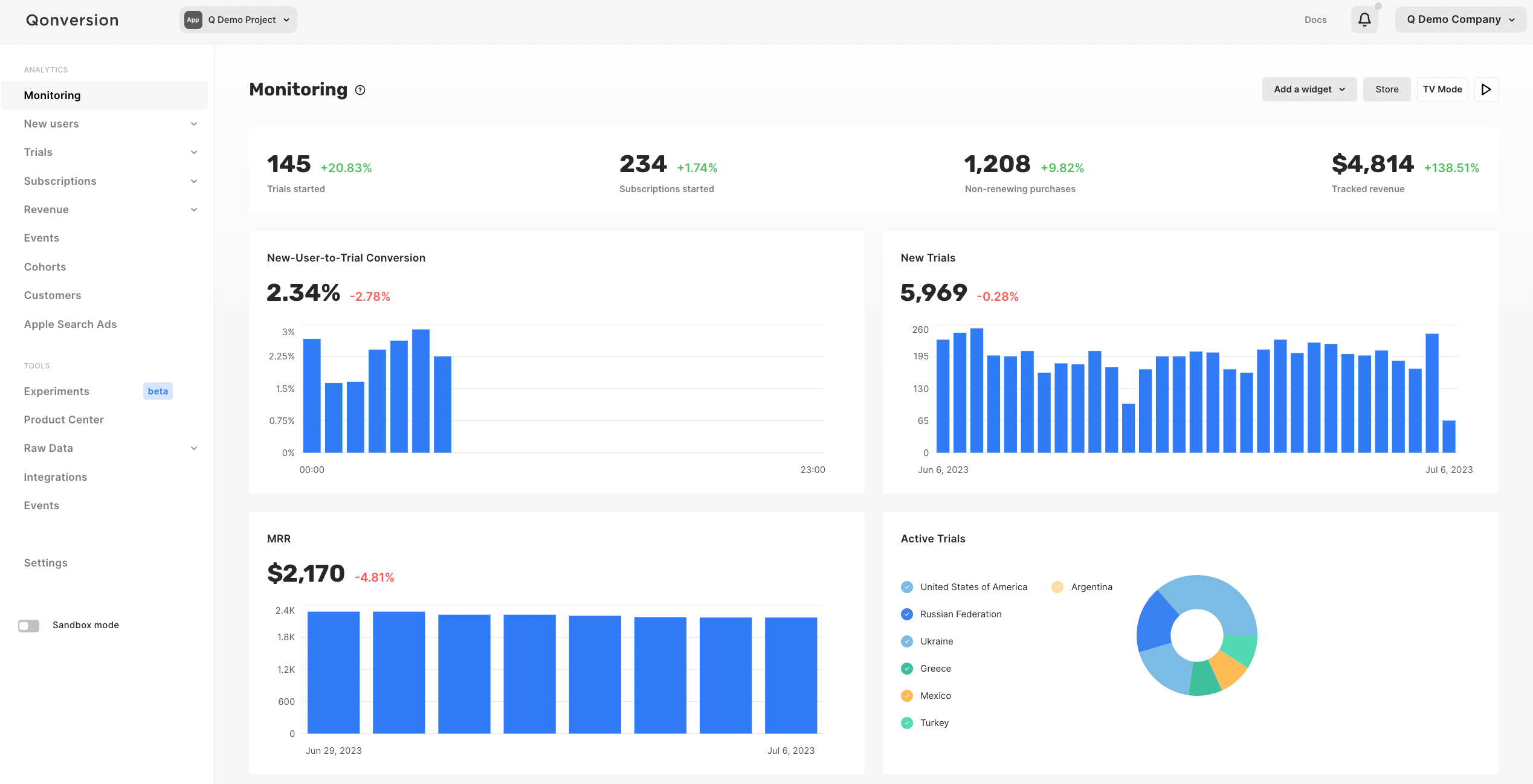
Qonversion provides advanced subscription analytics out-of-the-box. You can monitor real-time metrics from new users and trial-to-paid conversions to revenue, MRR, ARR, cohort retention and more. Understand your customers and make better decisions with precise subscription analytics.
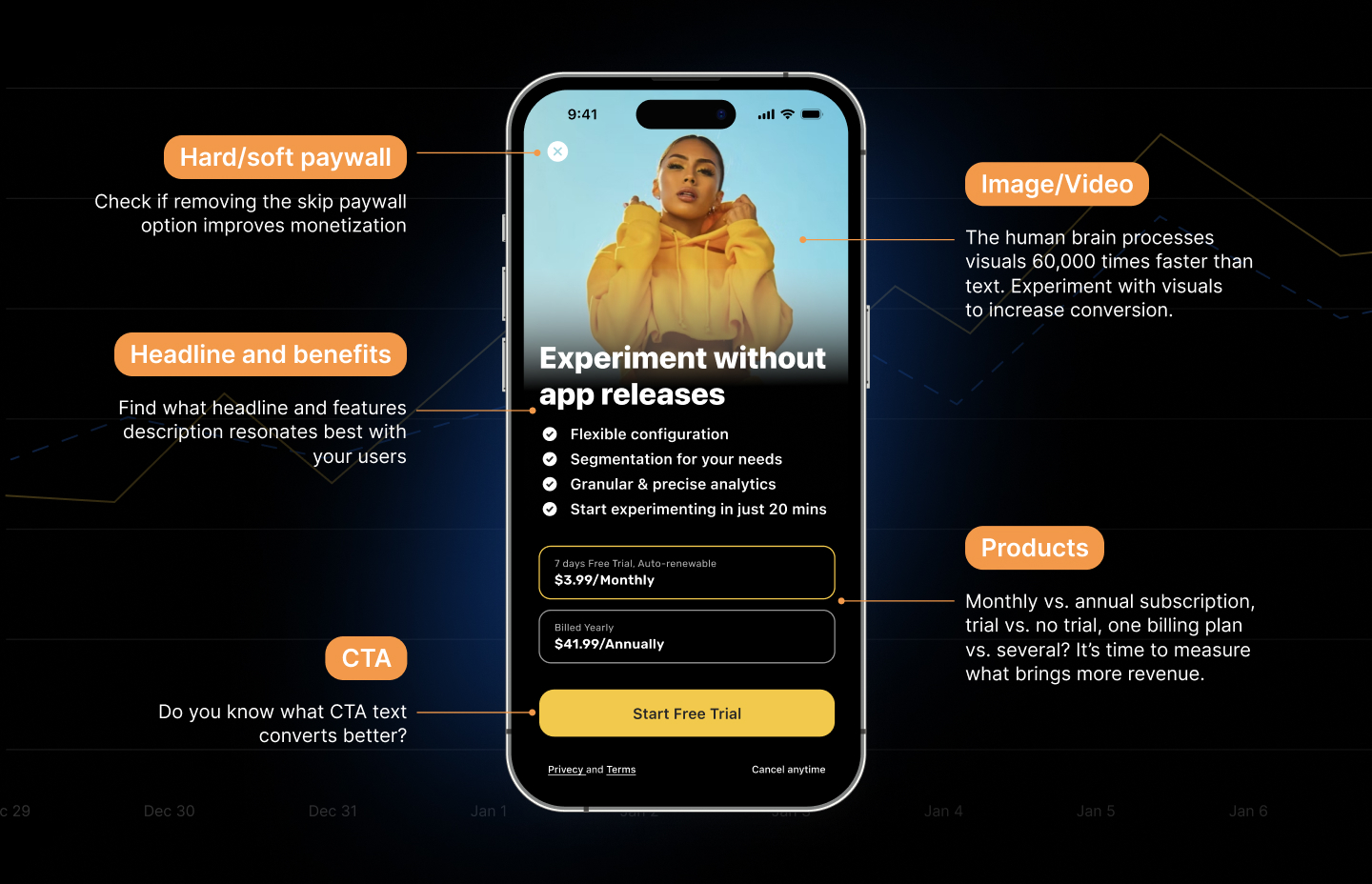
Qonversion's A/B Experiments feature provides everything required to quickly launch paywall and other monetization experiments, analyze results and roll out winning versions without releasing a new app build. Qonversion A/B Experiments include:
- User segmentation by country, install date, app version, free/paying user
- Traffic allocation
- Advanced subscription analytics
- Visualization of A/B experiments results
- Statistical significance of the results
- Roll out winning versions without app release with remote config
See more details here.
Create, customize, and launch high-converting paywalls and onboarding flows — in just a couple of lines of code!
The Qonversion No-Code Builder SDK is the fastest way to design and implement paywalls and onboarding flows in your app. Skip the development time with a drag-and-drop editor, built-in A/B testing, and real-time analytics.
- Quickly launch high-converting paywalls and onboarding screens using pre-built templates
- Customize UI components – Text, images, buttons, pricing options, and more
- A/B test paywalls and onboarding flows without app releases
- Real-time analytics for paywall and onboarding performance
See the No-Code Builder documentation.
Web to App lets a user who purchased on your website redeem that purchase inside the
native app. The web checkout sends the user an email containing a redemption link of
the form https://<your-host>/r/{project_uid}/{token}. When the user opens that link
on a device with your app installed, iOS routes it to your app as a
Universal Link, and the SDK
exchanges the token for an entitlement. The backend grants the entitlement to the
current app user, and the SDK refreshes entitlements so your next
checkEntitlements call sees it.
-
In Xcode, open your target → Signing & Capabilities → add the Associated Domains capability.
-
Add an entry for the host that serves your redemption links:
applinks:<your-host> -
Host an
apple-app-site-association(AASA) file athttps://<your-host>/.well-known/apple-app-site-associationthat maps the/r/*path to your app's App ID. Qonversion hosts the AASA for its default redemption host; if you serve links from your own domain, publish the AASA yourself. See Apple's Supporting Universal Links for the exact JSON format.
Only
httpsUniversal Links are accepted byhandleRedemptionLink. Custom URL schemes (e.g.myapp://) are intentionally rejected for the email handoff, because any installed app can register a custom scheme and hijack the token.
When iOS opens a Universal Link, forward it to the SDK from your
UIApplicationDelegate (or the corresponding SceneDelegate callback):
func application(
  _ application: UIApplication,
  continue userActivity: NSUserActivity,
  restorationHandler: @escaping ([UIUserActivityRestoring]?) -> Void
) -> Bool {
  guard userActivity.activityType == NSUserActivityTypeBrowsingWeb,
        let url = userActivity.webpageURL else {
    return false
  }

  Qonversion.handleRedemptionLink(url: url) { result in
    switch result {
    case .success:
      // Entitlement granted server-side for the current app user. The SDK has
      // refreshed entitlements; your next checkEntitlements call will see it.
      break
    case .tokenExpired:
      // The link's TTL elapsed — offer the reissue UI (see below).
      break
    case .alreadyConsumed:
      // The token was already redeemed (e.g. on another device).
      break
    case .invalidToken:
      // Tampered, mistyped, or stale link.
      break
    case .networkError:
      // The device could not reach the backend — ask the user to retry.
      break
    case .retryable:
      // The server was reachable but returned a transient error (rate limit,
      // 5xx, auth/config). Safe to retry later; do NOT show an offline error.
      break
    @unknown default:
      break
    }
  }

  return true
}
In a SwiftUI app, attach the handler with .onContinueUserActivity(NSUserActivityTypeBrowsingWeb)
or .onOpenURL and call Qonversion.handleRedemptionLink(url:completion:) the same way.
If redemption fails because the token expired (.tokenExpired) or install
attribution could not match the purchase, present the built-in reissue UI so the
user can request a fresh redemption email:
Qonversion.shared().presentReissueUI(from: viewController) { submitted in
  // `true`  — the user submitted their email (a new redemption email is sent).
  // `false` — the user dismissed the screen without submitting.
}
The reissue flow POSTs the user's email to Qonversion, which sends a new redemption link. Rate limiting (HTTP 429) is reported back so you can show an appropriate "try again later" message.
Send user-level subscription data to your favorite platforms.
- Amplitude
- Mixpanel
- Appsflyer
- Adjust
- Singular
- CleverTap
- All other integrations here

- No headaches with Apple's StoreKit & Google Billing. Qonversion provides simple methods to handle Apple StoreKit & Google Billing purchase flow.
- Receipt validation. Qonversion validates user receipts with Apple and Google to provide 100% accurate purchase information and subscription statuses. It also prevents unauthorized access to the premium features of your app.
- Track and increase your revenue. Qonversion provides detailed real-time revenue analytics including cohort analysis, trial conversion rates, country segmentation, and much more.
- Integrations with the leading mobile platforms. Qonversion allows sending data to platforms like AppsFlyer, Adjust, Branch, Tenjin, Facebook Ads, Amplitude, Mixpanel, and many others.
- Change promoted in-app products. Change promoted in-app products anytime without app releases.
- A/B test and identify winning in-app purchases, subscriptions or paywals.
- Cross-device and cross-platform access management. If you provide user authorization in your app, you can easily set Qonversion to provide premium access to authorized users across devices and operating systems.
- SDK caches the data. Qonversion SDK caches purchase data including in-app products and entitlements, so the user experience is not affected even with the slow or interrupting network connection.
- Webhooks. You can easily send all of the data to your server with Qonversion webhooks.
- Customer support. You can always reach out to our customer support and get the help required.
Convinced? Let's go!
# Qonversion SDK (includes No-Codes functionality)
pod 'Qonversion'// Qonversion SDK (includes No-Codes functionality)
.package(url: "https://github.com/qonversion/qonversion-ios-sdk.git", from: "6.0.0")import Qonversion
import NoCodes
// Initialize Qonversion SDK
let config = Qonversion.Configuration(projectKey: "your_project_key", launchMode: .subscriptionManagement)
Qonversion.initWithConfig(config)
// Use No-Codes functionality
let configuration = NoCodesConfiguration(projectKey: "your_project_key")
NoCodes.initialize(with: configuration)
NoCodes.shared.showScreen(withContextKey: "welcome")Check the full documentation to learn about implementation details and available features.
Whether you’re a core user or trying it out for the first time, you can make a valuable contribution to Qonversion by improving the documentation. Help us by:
- sending us feedback about something you thought was confusing or simply missing
- sending us a pull request via GitHub
- suggesting better wording or ways of explaining certain topics in the Qonversion documentation. Use
SUGGEST EDITSbutton in the top right corner.
Contributions are what make the open source community such an amazing place to learn, inspire, and create. Any contributions you make are greatly appreciated.
- Fork the Project
- Create your Feature Branch (
git checkout -b feature/SuperFeature) - Commit your Changes. Use small commits with separate logic. (
git commit -m 'Add some super feature') - Push to the Branch (
git push origin feature/SuperFeature) - Open a Pull Request
Contact us via issues on GitHub or ask a question on the site.
Qonversion SDK is available under the MIT license.