Official code for SkiTraVis — software for ski trajectory visualization and analysis from video sequences.
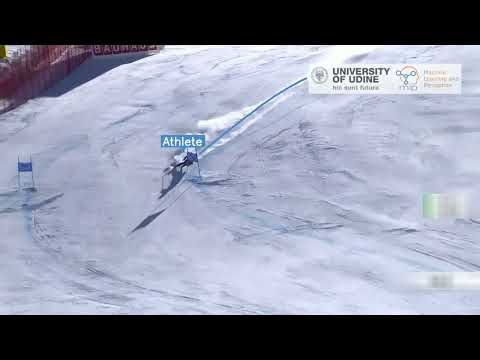
Trajectories are fundamental to winning in alpine skiing. Tools enabling the analysis of such curves can enhance the training activity and enrich broadcasting content. In this paper, we propose SkiTraVis, an algorithm to visualize the sequence of points traversed by a skier during its performance. SkiTraVis works on monocular videos and constitutes a pipeline of a visual tracker to model the skier's motion and of a frame correspondence module to estimate the camera's motion. The separation of the two motions enables the visualization of the trajectory according to the moving camera's perspective. We performed experiments on videos of real-world professional competitions to quantify the visualization error, the computational efficiency, as well as the applicability. Overall, the results achieved demonstrate the potential of our solution for broadcasting media enhancement and coach assistance.
Demo of the capabilities of SkiTraVis are available in this video:
Download the source code and install requirements.
git clone https://github.com/matteo-dunnhofer/SkiTraVis.git
cd SkiTraVis
Install requirements with:
conda env create -f skitravis.ymlCode tested on Ubuntu 22.04+, Python 3.8+, PyTorch 1.7+ (CUDA).
Download the YOLOv4 and STARK checkpoints trained for skier detection and tracking (on the SkiTB dataset) from here and put them in the checkpoints folder.
To run SkiTraVis use the run_skitravis.py script.
-
Specify input:
- --source PATH — path to a video file or a folder of frames (supports common video formats and image sequences).
- Example:
python run_skitravis.py --source /path/to/video.mp4
-
Default behavior:
- The skier is automatically detected in the first frame.
- The output video with the visualized trajectory is saved as an MP4 in the output/ folder (name derived from the input).
-
View while processing:
- Add --view to display the output window during processing:
python run_skitravis.py --source /path/to/video.mp4 --view
- Add --view to display the output window during processing:
-
Manual initialization:
- Add --manual-init to draw the initial bounding box yourself:
python run_skitravis.py --source /path/to/video.mp4 --manual-init
- A window opens for selection: click the top-left corner, drag to the bottom-right, then press Enter to confirm (Esc to cancel). Processing starts after confirmation.
- Add --manual-init to draw the initial bounding box yourself:
An example is given by:
bash demo.shFeel free to open an issue on GitHub for any problems. Otherwise you can contact me via e-mail by writing to matteo.dunnhofer@uniud.it.
If you find this work useful please cite
@inproceedings{dunnhofer2023visualizing,
  title={Visualizing Skiers' Trajectories in Monocular Videos},
  author={Dunnhofer, Matteo and Sordi, Luca and Micheloni, Christian},
  booktitle={IEEE/CVF Conference on Computer Vision and Pattern Recognition (CVPR) Workshops},
  pages={5188--5198},
  year={2023}
}
I look forward in collaborating to improve the robustness of SkiTraVis and to make the tool more user-friendly (e.g. easy usable for high-level users such as sport scientists or coaches).
We thank the authors of STARK, YOLOv5, SuperGlue, and Kornia for inspiring our work. The code in this repository heavily borrows from their original repositories.
License: MIT