This guide is an update to the previous Hackintosh guide for the Gigabyte Z390M GAMING mATX motherboard. It now targets macOS Sequoia (15.1.1 as of Dec 2, 2024). The majority of the credit for this update goes to [Gilberto-Mascena's Z390M-GAMING EFI].
- Introduction
- Wi-Fi Card BCM943602CDP Doesn't Work
- Quick Overview on How I Upgraded
- Key Differences from Gilberto-Mascena's Guide
- Installation Process
- Credits
- Questions or Issues
- Detailed Guide
The Wi-Fi functionality of the BCM943602CDP card is not supported, though Bluetooth works. For a workaround, refer to this guide.
-
Backup EFI: Ensure you have a backup of your current EFI folder.
-
Update OpenCore:
- Replace old OpenCore files with the latest release and update
config.plist.
- Replace old OpenCore files with the latest release and update
-
Update Kexts and Drivers: Download and replace with the latest versions.
-
Boot the current macOS version to validate updated EFI
-
Prepare macOS Installer:
- Use a tool to download the full macOS installer and create a bootable USB.
-
Copy Updated EFI to USB: Mount and copy the updated EFI to the USB's EFI partition.
-
Boot into Install Media: Restart and boot from the newly created USB drive.
- This guide uses an Intel Core i5-9600K CPU, while Gilberto-Mascena uses an i7-9700F
- The boot argument
agdpmod=pikerais added to prevent black screen issues with the RX 5700 GPU - USBToolBox was used to create a custom USB port map. The resulting
UTBMap.kextandUSBToolBox.kextare included in the EFI/OC/Kexts directory. - Verbose
-vboot flag is set for detailed startup messages
The general installation process remains the same as the original guide:
- Build USB Map using USBToolBox
- Configure ACPI
- Gather required Kexts, Drivers and Tools
- Configure OpenCore config.plist
- Update BIOS settings
- Install macOS Sequoia
Refer to the original guide for detailed steps on each part of the process. Use the updated kext and driver versions mentioned in this guide.
- Gilberto-Mascena for the Z390M-GAMING EFI update that inspired this guide
- The hackintosh community on r/hackintosh for their support and troubleshooting help
If you encounter any problems following this guide, please post your questions on the r/hackintosh subreddit where there is a very knowledgeable and helpful hackintosh community.
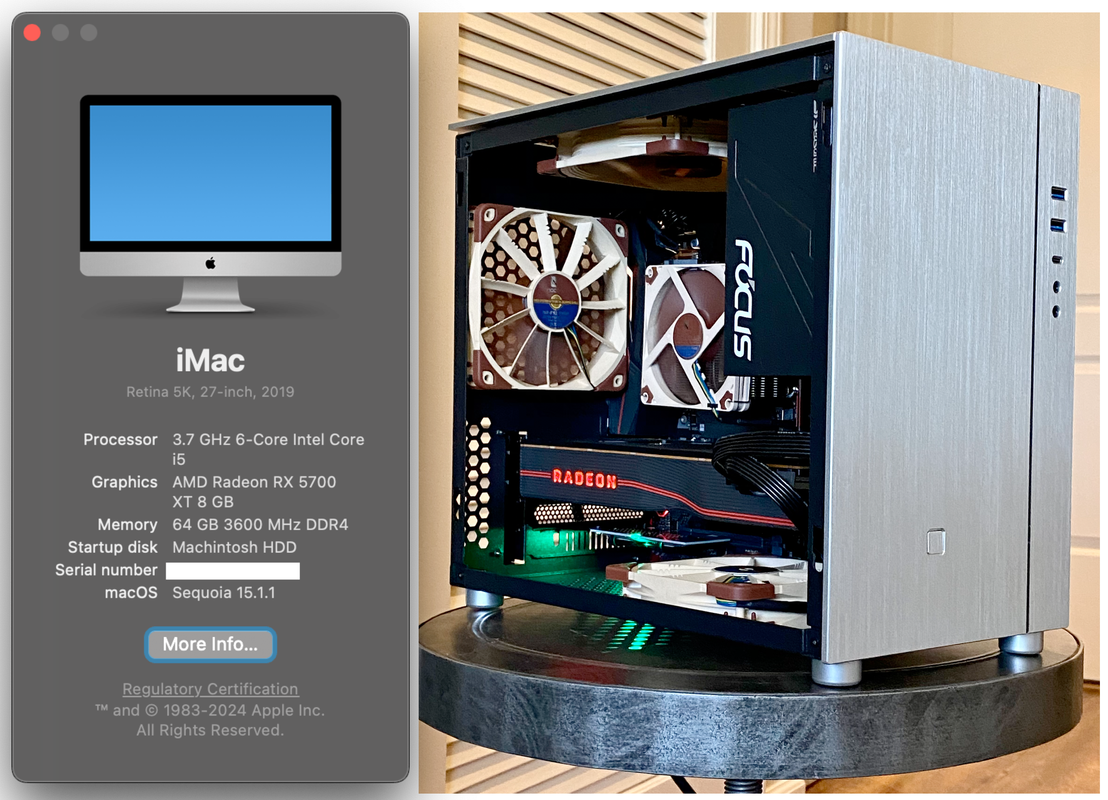
This guide aims to build a parallel to the Apple iMac 27-Inch "Core i5" 3.7 (5K, 2019). This is a vanilla install guide and I reccomend against using any pre-packaged images or distrobutions.
- Ethernet
- IGPU in headless mode
- App Store
- Wake/Sleep
- Restart
- Shutdown
- USB (Correct SS/HS speed)
- All DP and HDMI port
- Dual monitor from boot
- Apple Music (iTunes)
- iMessage
- Facetime
- Handoff
- Airdrop
- Continuity
- AirPlay
- Apple TV+
- Netflix/Prime in Safari
- Docker
- VMware Fusion
- FileVault
- Power Nap
- Built-in WiFi and Bluetooth. May work with itlwm. If you need stable WiFi+BT, use native apple card
| Components | SKU | Comments |
|---|---|---|
| CPU | Intel Core i5-9600K | Coffee Lake - 3.70 GHz Hexa-Core Base Frequency 3.70 GHz Max Turbo Frequency 4.60 GHz (BX80684I59600K) |
| iGPU | Intel UHD Graphics 630 | Only for DRM support (Apple TV+) |
| Motherboard | Gigabyte Z390M Gaming mATX | Not interchangeable with other SKUs |
| WiFi Adapter | BCM943602CDP (4 antennas) | Bluetooth 4.2 (Including NGFF to M.2 Adapter) |
| Graphics Card | PowerColor Radeon RX 5700 8 GB Video Card | |
| HDD - NVMe | WD Black SN750 NVMe SSD 2TB | MacOS boot drive |
| HDD - NVMe | WD Black SN750 NVMe SSD 1TB | Win10 boot drive |
| HDD - NVMe | WD Black SN750 NVMe SSD 1TB | Shared drive (games + vm storage) |
| RAM | Corsair Vengeance LPX 32GB (2x16GB) DDR4 X.M.P | Recommend 3200MHz / Better 3600MHz |
| PSU | Seasonic FOCUS PX-550 | Full-Modular, Fan Control, Silent |
| PC Case | Goodisory S200 | SFF |
| CPU Cooler | Noctua NH-L9x65 | Low-Profile CPU Cooler |
| Cooling Fan | Noctua NF-F12 PWM | 12cm |
| Components | SKU | Comments |
|---|---|---|
| Monitor | Dell UltraSharp U2718Q | 27" 16:9 4K HDR IPS |
| Monitor | Dell Gaming Monitor S2721DGF | 27″ 1440p 165Hz HDR Nano IPS panel |
| Audio | Firestone Audio Bravo 24/96 Digital Processor | 24-bit audio via USB 2.0 Does not require drivers |
| Keyboard | Leopold FC660C | Topre switch |
| Mouse | Logitech MX Master 2 | Logitech Unifying Receiver - RF Wireless |
| Mouse | Logitech G604 | Lightspeed Wireless |
- Build USB Map
- Build SSDT/DSDT
- Gather Files
- Configure OpenCore
- Configure BIOS
| Items | Version | Date |
|---|---|---|
| BIOS | F9m | Sunday, June 27, 2021 |
- Make sure the IGP is set to Enabled for the Framebuffer to be recognized (Auto will not work)
- Disable CFG Lock
- Disable Serial Port
- Advanced Mode > Settings > Above 4G Decoding > Enabled
- Advanced Mode > Settings > USB Configuration > XHCI Hand-off > Enabled
- Advanced Mode > Boot > CSM Support > Disabled
| Kexts | Last Version | Use | Comments |
|---|---|---|---|
| Lilu | 1.5.5 | /Volumes/EFI/EFI/OC/Kexts/ | |
| VirtualSMC | 1.2.6 | /Volumes/EFI/EFI/OC/Kexts/ | |
| WhateverGreen | 1.5.2 | /Volumes/EFI/EFI/OC/Kexts/ | |
| NVMeFix | 1.0.9 | /Volumes/EFI/EFI/OC/Kexts/ | |
| IntelMausi | 1.0.7 | /Volumes/EFI/EFI/OC/Kexts/ | |
| Not Currently in use (Sunday, June 27, 2021) | |||
| AGPMInjector | 3.3.4 | /Volumes/EFI/EFI/OC/Kexts/ | |
| USBToolBox kext | 1.1.0 | /Volumes/EFI/EFI/OC/Kexts/ | |
| UTBMap* | 0.0.9 | /Volumes/EFI/EFI/OC/Kexts/ | Generated using the ToolBox tool |
| CPUFriend | 1.2.4 | /Volumes/EFI/EFI/OC/Kexts/ |
*USB Map must be generated. See USB section below.
| Drivers | Use | Comments |
|---|---|---|
| HfsPlus.efi | /Volumes/EFI/EFI/OC/Drivers/ | |
| OpenRuntime.efi | /Volumes/EFI/EFI/OC/Drivers/ | From OpenCore download |
| Tools (non-EFI)** | Last Version | Use |
|---|---|---|
| USBToolBox tool | 0.0.9 | Generating USB Map |
| GenSMBIOS | Generate SMBIOS Info | |
| gibMacOS | 9a683e7 | Download MacOS |
| ProperTree | d9bbf09 | .plist editor |
**Do not add to EFI/OC/Tools directory
Recognized Properly maping your USB ports is critical for this guide to work.
- Launch a Windows 10 Live CD
- Download and run USBToolBox/tool
- Plug USB devices in each of the root USB ports on your motherboard
- Select Discover Ports and wait for the listing to populate
- Do not connect hubs
- Enter Select Ports screen
- Select the ports that are populated and their associated ports - Keep this below 15 total ports
- Press 'k' to build your kext
- Move the generated kext to your '/Volumes/EFI/EFI/OC/Kexts/'
- Also place the USBToolBox/kext in the same folder - '/Volumes/EFI/EFI/OC/Kexts/'
Two options:
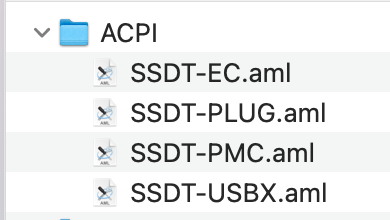
The end result should look similar to this:
| ACPI FILE | SOURCE | Use | Guide |
|---|---|---|---|
| SSDT-EC.aml | Generate using SSDTTime | /EFI/EFI/OC/ACPI/ | Dortania Guide |
| SSDT-PLUG.aml | Generate using SSDTTime | /EFI/EFI/OC/ACPI/ | Dortania Guide |
| SSDT-PMC.aml | Generate using SSDTTime | /EFI/EFI/OC/ACPI/ | Dortania Guide |
| SSDT-USBX.aml | Download | /EFI/EFI/OC/ACPI/ | Dortania Notes |
From the files provided you can use the ACPI section with limited success. It's a reasonable place to start but you should eventually generate your own SSDT/DSDT. Unless you are using the exact same CPU/Motherboard combination you will have to swap in some generic prebuilt ACPI files.
- Use versioning! (Git repo or iCloud Drive - Use something!)
- Use ProperTree
- First place all the files properly in your EFI folder
- After the config is opened, press Cmd/Ctrl + Shift + R and point it at your EFI/OC folder to perform a "Clean Snapshot":
- This will remove all the entries from the config.plist and then adds all contents of your /EFI/ folder content to the config.plist
- Then go through and make your plist changes
When creating a new hackintosh or if you're updating OpenCore start with a fresh conflig.plist to make sure you're working with what is compatible with the latest version of OpenCore. Things frequently move around - You'll have to pay attention.
| Items | Last Version | Use | Comments |
|---|---|---|---|
| OpenCore | 0.7.2 | /Volumes/EFI/ |
Follow the offical guide for setting up your installer EFI
- Sample/config.plist(opens new window)
- See previous section on how to obtain: config.plist Setup
| Quirk | Enabled | Comment |
|---|---|---|
| DevirtualiseMmio | YES | |
| EnableWriteUnprotector | NO | |
| ProtectUefiServices | YES | Needed on Z390 system |
| RebuildAppleMemoryMap | YES | |
| SyncRuntimePermissions | YES |
| AAPL,ig-platform-id | Comment | Enabled? |
|---|---|---|
07009B3E |
Used when the Desktop iGPU is used to drive a display | Yes |
00009B3E |
Alternative to 07009B3E if it doesn't work |
|
0300913E |
Used when the Desktop iGPU is only used for computing tasks and doesn't drive a display |
This was removed as I am using USB devices for audio
YOU MUST UPDATE SMBIOS INFO for iServices to work
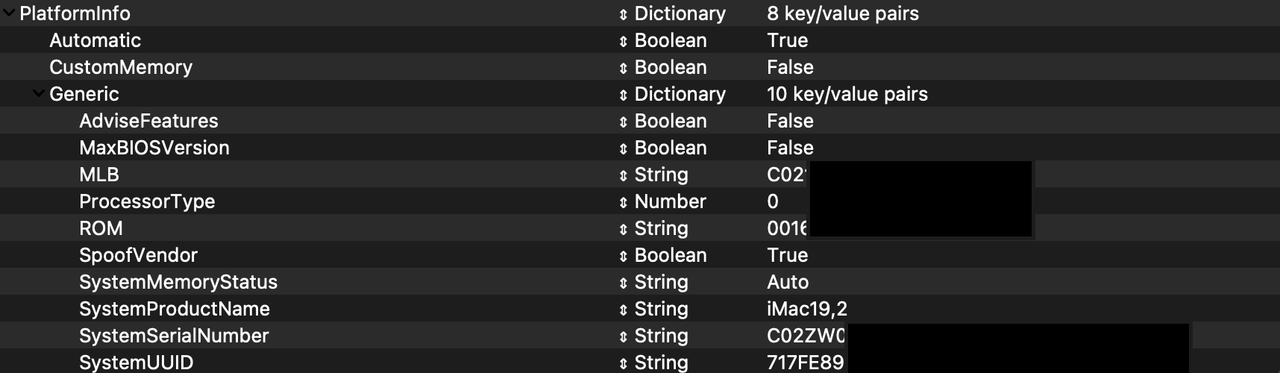
If you use the config.plist from this project you must update the following.
| Key | Config.plist | Tool | Comments |
|---|---|---|---|
| MLB | PlatformInfo -> Generic | GenSMBIOS | |
| ROM | PlatformInfo -> Generic | This tutorial then this next step | |
| SystemProductName | PlatformInfo -> Generic | GenSMBIOS | |
| SystemSerialNumber | PlatformInfo -> Generic | GenSMBIOS | |
| SystemUUID | PlatformInfo -> Generic | GenSMBIOS |
| SMBIOS | Hardware |
|---|---|
| iMac19,2 | Currently using (Sunday, June 27, 2021) |
| iMac19,1 | For Mojave and newer |
Follow the official guide for this section
Follow the official guide for this section
Follow the official guide for this section
keepsyms=1 debug=0x100 alcid=1 agdpmod=pikera -v
| Boot arg | Use | ||
|---|---|---|---|
| keepsyms=1 | This is a companion setting to debug=0x100 that tells the OS to also print the symbols on a kernel panic. | ||
| debug=0x100 | This disables macOS's watchdog which helps prevents a reboot on a kernel panic. | ||
| alcid=1 | Unused for this guide - Used for setting layout-id for AppleALC | ||
| agdpmod=pikera | Used for disabling board ID checks on Navi GPUs(RX 5000 series), without this you'll get a black screen. Don't use if you don't have Navi(ie. Polaris and Vega cards shouldn't use this) | ||
| -v | This enables verbose mode |
You'll want to regularly update your EFI to keep the process simple. I typically wait for the latest release (11.x.x) of MacOS to mature a few weeks before attempting this procedure as OpenCore and the Kext developers will have time to catch up.
-
Download the needed files
- See the gathering files section.
-
Download the latest OpenCore Releases - Typically the first Monday of every month
-
In the download file you'll find the differences.pdf
- /OpenCore-0..-RELEASE/Docs/Differences.pdf
- Review the document and see if any of the OC features you depend on have any updates. This is where you will find what is incompatible between versions.
- Many OC updates and incompatibilities between versions stem from using ALC audio. I forgo the on-board audio and go with an external USB DAC which is fully compatible with MacOS.
Please post on /r/Hackintosh on reddit as they heavily push the vanilla hackintosh method and have been great help in the past