Home
Welcome to PXAudit.
I made PXAudit because I was checking PRIDE submissions by hand and got tired of repeating the same steps. I also wanted the result to still be there when I came back to a dataset, instead of piecing the same check together again.
PXAudit reads project metadata and file listings from the PRIDE Archive. It does not download raw data or result files. Each completed audit produces:
- a seven-level FAIR tier;
- a separate quantification-readiness tier;
- the evidence flags behind both scores;
- a file inventory; and
- a local SQLite record that can be queried, exported, or rendered as an HTML report.
PXAudit supports Python 3.12 through 3.14. From a source checkout:
git clone https://github.com/LangeLab/PXAudit.git
cd PXAudit
uv sync
uv run pxaudit check PXD000001
Note
The first audit queries PRIDE, caches the project and file-list responses under ~/.pxaudit_cache/, and creates pxaudit_results.db in the current directory. A completed audit writes the study, file inventory, and score together in one transaction.
Run the same accession again to reuse fresh cached responses:
uv run pxaudit check PXD000001Use --refresh to try PRIDE before any stale fallback, or --no-cache when the run must perform no cache reads or writes:
uv run pxaudit check PXD000001 --refresh
uv run pxaudit check PXD000001 --no-cacheThe qualitative tier describes how far the submission progresses through the FAIR evidence ladder, from missing mandatory metadata to a complete Diamond profile. The quant tier answers a different question: whether the deposited identification, abundance-table, and method metadata support quantitative reuse.
The score is not inferred from a label alone. PXAudit stores the underlying flags, including PSI-standard results, open spectra, SDRF, organism part, publication, quantification tables, and method metadata. See Tier System for the exact gates and worked examples.
Create a text file with one accession per line:
# pilot cohort
PXD000001
PXD004683
PXD073444
Then audit and export it:
uv run pxaudit bulk-audit \
  --input accessions.txt \
  --format tsv \
  --output audit.tsv
Blank lines and lines beginning with # are ignored. Input is canonicalized to uppercase and duplicates are skipped. Use --continue-on-error when one invalid or unavailable accession should not stop the rest of the batch.
The manifest command reads a stored file inventory without contacting PRIDE:
uv run pxaudit manifest PXD004683
uv run pxaudit manifest PXD004683 --format json
Install the optional report dependencies and generate a self-contained HTML report:
uv sync --extra report
uv run pxaudit report --db pxaudit_results.db --output report/
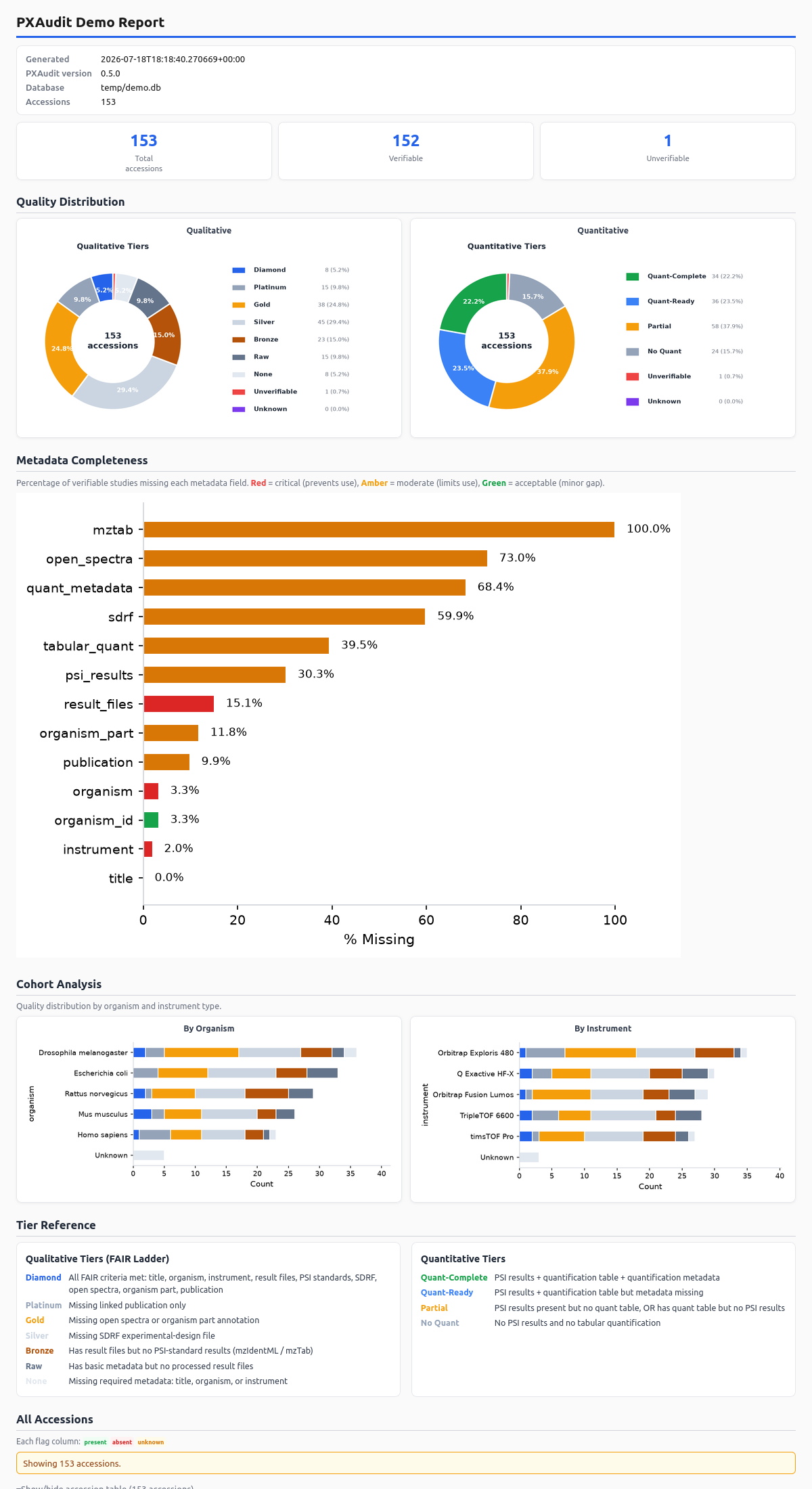
The report contains qualitative and quantitative distributions, metadata gaps, the ten largest organism and instrument cohorts, tier definitions, and a quality-sorted accession table.
Important
I would rather return no score than make a failed request look like negative scientific evidence. If the project or file response cannot be fetched and no compatible stale cache entry exists, PXAudit exits with an error and does not write a new audit. An older completed database record remains untouched.
Default and --refresh runs may use compatible stale cache entries after a live failure and will say when they do. --no-cache disables that fallback. See CLI Reference for the complete cache and failure contracts.
PXAudit 0.5.1 queries PRIDE for canonical PXD accessions. Safe identifiers from MassIVE, jPOST, iProX, and other repositories are accepted for storage but score Unverifiable; PXAudit does not pretend that PRIDE supplied evidence for them.
- CLI Reference covers every command, option, configuration value, cache mode, and exit code.
- Tier System explains file evidence, FAIR gates, quantification readiness, and re-scoring.
- Database Schema documents tables, types, relationships, migrations, and SQL examples.
- FAQ answers common setup, scoring, cache, and report questions.
- Development covers architecture, tests, style, CI, and documentation changes.