
Fast NDS Emulator for ARM32/PSVita
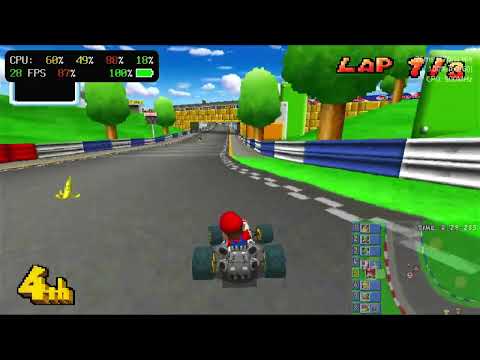
Most games run, with these caveats:
- 3D rendering is mostly implemented
- Z fighting can occur
- Games using 3D on both screens will have bad framerates and stutters
- Some effects like fog are unimplemented
- 2D rendering is mostly complete
- ARM7 HLE (the
Arm7 Emulationsetting,Hle) doesn't work with some games- If a game doesn't boot, gets stuck or crashes, switch to
SoundHleorAccurateLle— each step is more compatible but slower
- If a game doesn't boot, gets stuck or crashes, switch to
- Auto frameskip is always used
- The FPS counter will often show 20-30 fps even when the game logic runs at full speed
- No scanline rendering, so games that update VRAM mid-frame will not render correctly
- Few games do this; those that do mostly use it for scrolling text
- Grab the latest vpk from releases
- Install
libshacccg.suprx, follow this guide or just install and open VitaDB - Install
kubridge.skprxversion >= 0.3.1 from https://github.com/bythos14/kubridge/releases- Make sure this plugin is in the
*KERNELsection, otherwise the app might crash upon opening - If you have the wrong version installed, the app will either crash or will not be able to launch any games
- Make sure this plugin is in the
- It's strongly recommended to overclock your Vita to 500MHz
- Create the folder
ux0:data/dsvitaand put your roms there- They must have the
.ndsfile extension
- They must have the
- Check out the compatibility list for popular games
Feel free to create an issue if you run into problems. Before reporting, please make sure the
issue still occurs with the Arm7 Emulation setting set to AccurateLle.
Install cargo
You need to have both llvm-18 and llvm-21 installed.
- llvm-18 is required for bindgen, newer versions struggle to parse class sizes correctly
- llvm-21 is used for building C/C++ libraries
Clone the repo
$ git clone --recurse-submodules https://github.com/Grarak/DSVita.gitGet an armhf sysroot with libsdl2 development packages installed
- On ubuntu >= 22.04
$ sudo apt install debootstrap qemu-user-static
$ sudo debootstrap --foreign --variant=buildd --arch=armhf jammy ./ubuntu-armhf https://ports.ubuntu.com
$ sudo cp /usr/bin/qemu-arm-static ubuntu-armhf/usr/bin/
$ sudo chroot ubuntu-armhf /debootstrap/debootstrap --second-stage
$ apt update && apt install libsdl2-dev # If apt can't find the package make sure the source has "main restricted universe multiverse" defined in /etc/apt
$ LIBCLANG_PATH=<path to llvm-18 library> DSVITA_SYSROOT=<path to armhf sysroot> cargo build --target thumbv7neon-unknown-linux-gnueabihf --releaseThe build variables above and the helper scripts in tools/ (launching under qemu, remote
test box runs, screenshots, instruction traces — see tools/README.md) read their paths from
environment variables. Copy the example file and fill in your own setup:
$ cp .env.example .env # then edit .env with your pathsThe tools/ scripts source .env automatically. To use it for cargo builds:
$ set -a; . ./.env; set +a
$ cargo build --target thumbv7neon-unknown-linux-gnueabihf --release
.env is gitignored — it's your machine-specific setup. Development background (JIT/interpreter
invariants, debugging playbook) lives in DEVELOPMENT.md.
- Install Vitasdk
- Install cargo vita
$ LIBCLANG_PATH=<path to llvm-18 library> cargo vita build vpk -- --releaseThe Android port is still experimental and has no releases yet. It needs an Android NDK (sysroot only, the compiling is done by host clang-21):
$ export ANDROID_NDK_HOME=<path to ndk>
$ cd android && ./gradlew assembleDebug # builds libdsvita.so via cargo and packs the apkTo obtain the most optimized build you need to use a patched rust compiler due to LTO incompatibility. The upstream rust compiler doesn't set the target cpu and target features in the callsite attributes which prevents the clang linker from inlining cross language functions.
$ RUSTC=<path to compiled rustc> LIBCLANG_PATH=<path to llvm-18 library> RUSTFLAGS="-Zlocation-detail=none -Zfmt-debug=none -Zub-checks=no -Zsaturating-float-casts=no -Ztrap-unreachable=no -Zmir-opt-level=4 -Clinker-plugin-lto -Clto=fat -Zunstable-options -Cpanic=immediate-abort" cargo vita build vpk -- --releaseThe toolchain is also pinned to an older rust nightly (see rust-toolchain.toml), the last one built against llvm-21 — newer llvm versions cause performance regressions.
- Install (replace your existing udcd-uvc install) https://github.com/Grarak/vita-udcd-uvc/releases/tag/1.0 under the
*KERNELsection of your config.txt - Install https://github.com/GrapheneCt/CapUnlocker
- Enable the stream top screen setting
- If you only get a black screen, reboot your vita (you might need multiple reboots)
- NooDS was used as reference. A lot of code was taken from there.
- melonDS for ARM7 HLE implementation and jit optimizations.
- DesmumePSPExperimental for ARM7 HLE implementation.
- pokediamond for ARM7 HLE implementation.
- DSHBA Copied some PPU hardware acceleration implementation (Thanks for xiro28 linking me the repo)
- vitaGL 2D/3D hardware acceleration wouldn't be possible without it
- Tonc GBA PPU documentation
- GBATEK GBA/NDS documentation
- kubridge For fastmem implementation
- @TheIronUniverse for livearea assets
- dolphin For audio stretching code