
Kubernetes infrastructure for the hotel reservation final project.
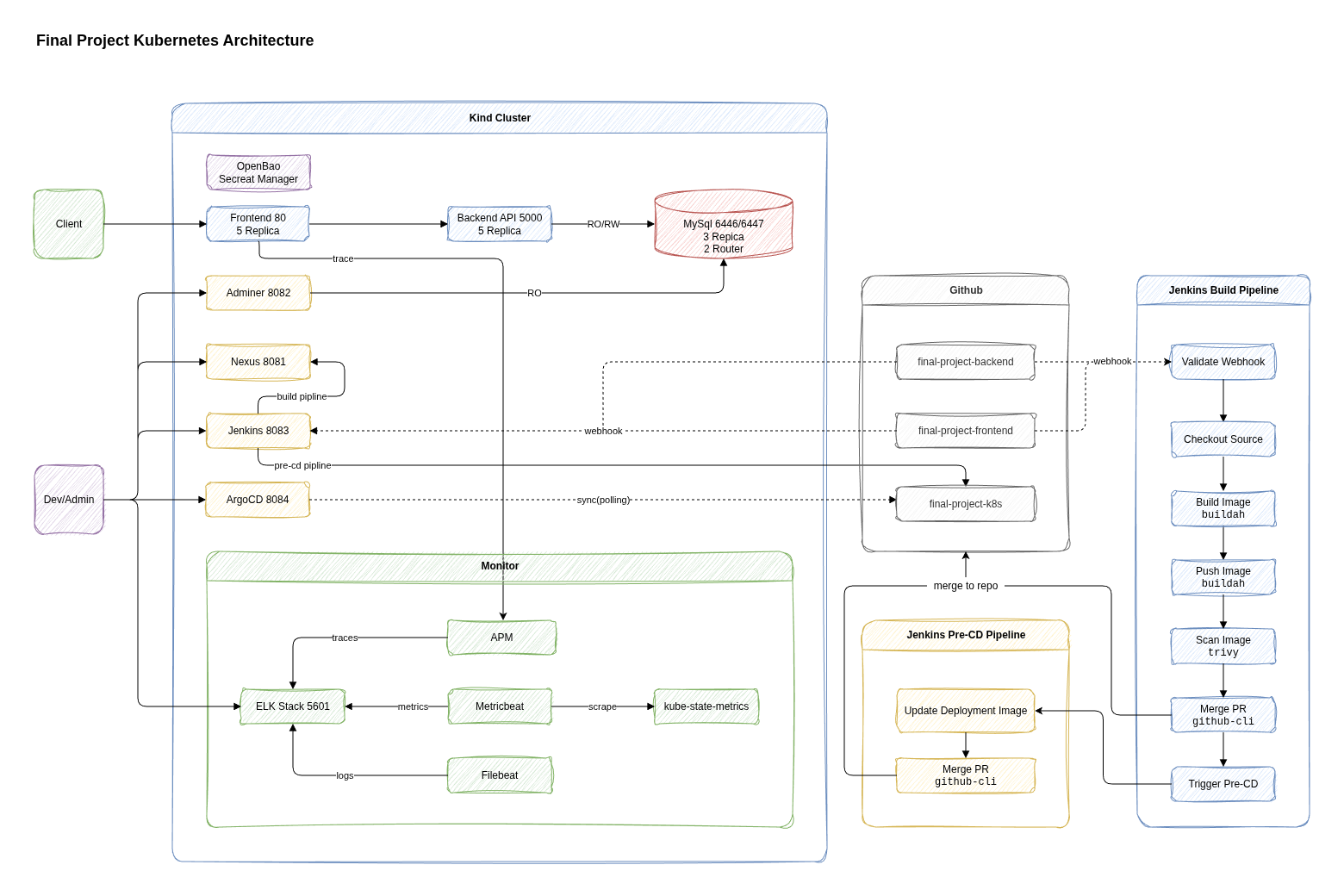
This repo deploys:
- Frontend & Backend
- MySQL
- Adminer
- Nexus registry
- Jenkins with Kubernetes agents
- Argo CD applications
- OpenBao
- Elasticsearch, Kibana, Logstash, Beats, kube-state-metrics, and APM
- Docker or Podman
- Kind
kubectl- GitHub credentials for Jenkins and Argo CD
OpenBao is the only source of project secrets. Copy its example seed file before bootstrapping the cluster:
cp openbao/secrets.example.json openbao/secrets.jsonFill in every value in openbao/secrets.json. Do not commit the real file. OpenBao stores the values at secret/final-project and provides the Kubernetes Secrets required by the workloads.
Frontend:        http://localhost:80
Backend API:     http://localhost:5000
Kibana:          https://localhost:5601
APM server:      http://localhost:8200
Nexus UI:        http://localhost:8081
Nexus registry:  localhost:5001
Adminer:         http://localhost:8082
Jenkins:         http://localhost:8083
Argo CD:         http://localhost:8084
kind create cluster --config kind-config.yaml
kubectl config use-context kind-final-projectThis creates shared namespaces, installs the Elastic operator, MySQL operator, OpenBao operator, and Argo CD.
kubectl apply --server-side --force-conflicts -k .kubectl wait --for=condition=complete \
job/final-project-openbao-init-secrets \
-n openbao \
--timeout=5m
kubectl delete secret final-project-openbao-seed -n openbaokubectl apply -k argocd/appsGet the Argo CD admin password:
kubectl -n argocd get secret argocd-initial-admin-secret -o jsonpath="{.data.password}" | base64 -d; echoUsername: admin
Get the Nexus admin password:
kubectl -n nexus exec deploy/nexus -c nexus -- cat /nexus-data/admin.passwordUsername: admin
Create a Docker hosted repository:
Recipe: docker (hosted)
Name: docker-hosted
HTTP: 5001
Create a Nexus role:
Type: Nexus role
Role ID: nx-docker
Role Name: nx-docker
Modify Applied Privileges: nx-repository-view-docker-docker-hosted-*
Create a local Nexus user for image pulls:
ID(username): k8s
Password: "****"
Status: Active
Role Granted: nx-docker
Enable the Docker Bearer Token Realm:
Active:
  - Local Authenticating Realm
  - Docker Bearer Token Realm
Set the same Nexus username and password in openbao/secrets.json. The OpenBao initialization job creates the image pull credentials for the backend and frontend namespaces.
Login locally:
docker login localhost:5001For local testing, add the insecure registry to Docker daemon.json:
{
  "insecure-registries": ["localhost:5001"]
}Jenkins uses JENKINS_ADMIN_ID and JENKINS_ADMIN_PASSWORD synchronized from OpenBao.
Add this webhook to the backend and frontend repositories:
http://<jenkins-url>/generic-webhook-trigger/invoke?token=build
GitHub cannot reach localhost:8083, so expose Jenkins with a tunnel or public URL. The trigger runs only for pushes to dev.
Get the Elasticsearch password:
kubectl get secret elasticsearch-es-elastic-user \
  -n elastic-system \
  -o go-template='{{.data.elastic | base64decode}}'
Username: elastic
Run this in Kibana Dev Tools to fix index status in the local single-node cluster:
PUT /*/_settings?expand_wildcards=all
{
  "index": {
    "number_of_replicas": 0
  }
}
Create these data views in Kibana:
Name: filebeat
Index pattern: filebeat-*
Timestamp field: @timestampName: metricbeat
Index pattern: metricbeat-*
Timestamp field: @timestampThe Backend API and Frontend manifests expect images in the local Nexus registry:
localhost:5001/final-project-backend:<tag>
localhost:5001/final-project-frontend:<tag>
Build and push these images from the Backend and Frontend repositories after Nexus is configured.