
MP3te is a lightweight CLI/GUI MP3 tag editor designed for speed and simplicity.
Built with a modern dark interface, it allows for quick editing of metadata, cover art management, and change tracking.
⚖️ Disclaimer:
this software is provided "as is", without warranty of any kind. the Author takes no responsibility for data loss or system instability
VirusTotal reports:
detection results are false positives
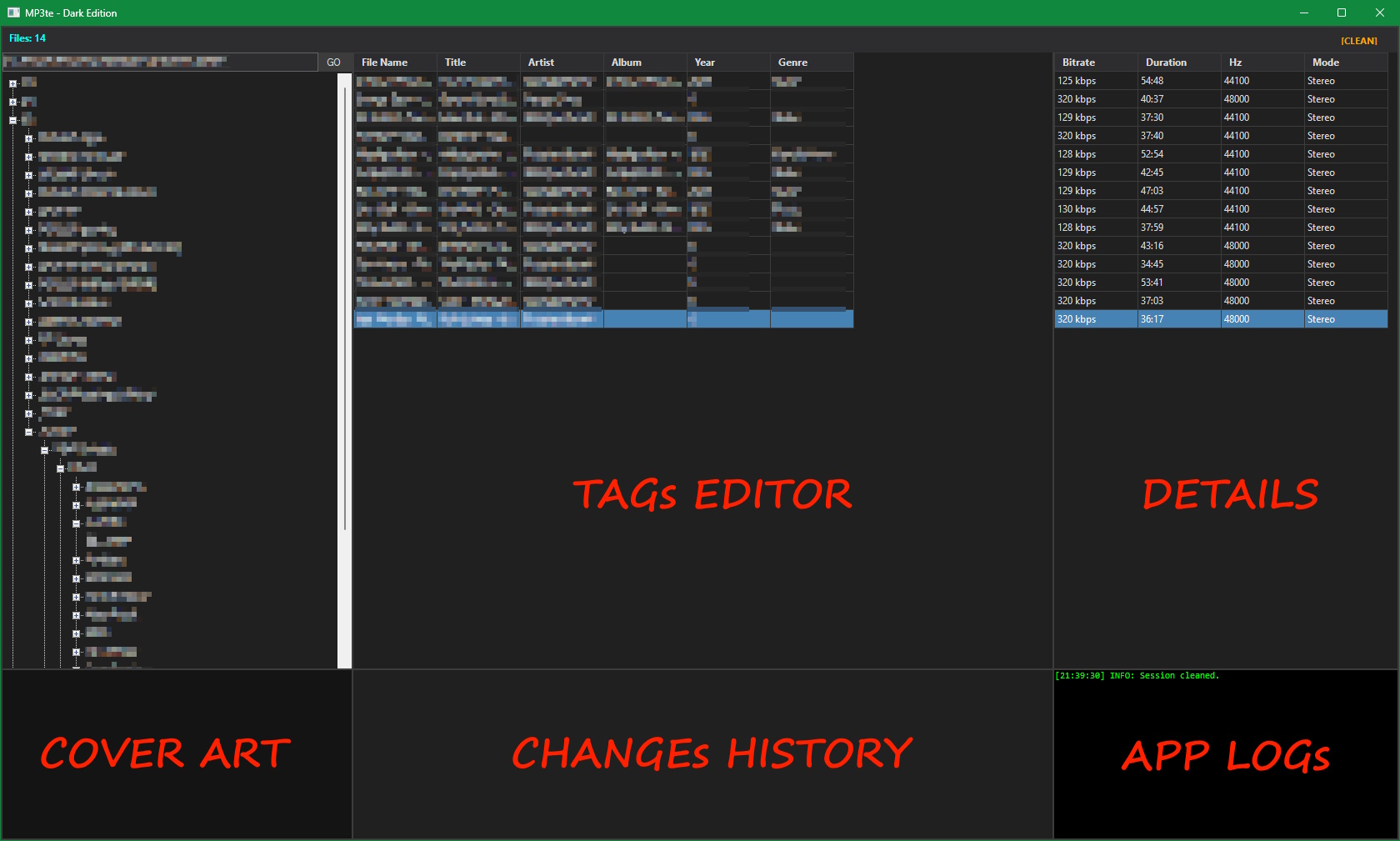
- Path Bar: Quick navigation input with "GO" button.
- File Counter: Shows the total count of loaded MP3 files.
- Control Buttons: Includes the [CLEAN] button to reset session data.
- Drive & Folder Tree: Explorer-style tree view to navigate drives and directories.
- Cover Art Preview: Displays the embedded album art of the currently selected track. Context menu allows replacing the image.
- Main Grid: The primary workspace for editing metadata (Title, Artist, Album, Year, Genre). Changes are saved immediately upon leaving a cell.
- History Log: A chronological list of all modifications. Double-click or press Del to undo changes.
- Technical Grid: Read-only view of audio properties (Bitrate, Duration, Hz, Mode).
- Application Log: A scrolling console output showing internal operations, errors, and confirmation messages.
- CLI/GUI Architecture: Run as a fully functional Windows GUI application or use command-line arguments for batch automation/scripting.
- Fast Tag Editing: Powered by TagLibSharp for reliable reading and writing of ID3v1/ID3v2 tags.
- Batch Processing: Load entire folders recursively with automatic file tree generation.
- Portable Design: Single executable (plus one DLL dependency), no installation required. Settings are stored in a local .ini file.
- Modern Dark Theme: Custom dark color scheme optimized for Windows 10/11, including native dark scrollbars support.
- 3-Column Grid Layout:
- Left: Navigation Tree, Path Bar, and Cover Art.
- Center: Main Tag Editor (Grid) and Change History.
- Right: Technical Details and Event Log.
- Responsive Design: Resizable splitters with an automatic "Clean Layout" reset on startup to prevent UI glitches.
- Spreadsheet-Style Editing: Edit Title, Artist, Album, Year, and Genre directly in the grid.
- Cover Art Support: View embedded cover art and replace it via right-click context menu.
- History & Undo System: Tracks every change made during the session.
- Selective Undo: Revert specific changes from the history list.
- Multi-Select: Undo multiple actions at once via Ctrl or Shift selection.
- Clean Session: dedicated [CLEAN] button to instantly clear logs and history without reverting file changes.
- Real-time Logging: Color-coded event log (Info, Warning, Error) for all operations.
- Audio Analysis: Displays technical metadata including Bitrate, Duration, Sample Rate (Hz), and Channel Mode (Stereo/Mono).
- Crash Protection: Safe handling of image streams to prevent GDI+ errors and memory leaks.
- Windows 10/11
- .NET Framework 4.7.2 or higher
- TagLibSharp.dll (included in build)
from the source folder: & "C:\Windows\Microsoft.NET\Framework64\v4.0.30319\csc.exe" /target:winexe /out:<PATH_OUTPUT>\MP3te.exe /optimize+ /win32icon:"<PATH_SOURCE>\MP3te.ico" /reference:TagLibSharp.dll /reference:System.Windows.Forms.dll /reference:System.Drawing.dll /reference:System.dll /reference:System.Core.dll *.cs
from the folder of the .exe (or add the folder in ENV PATH): MP3te.exe "C:\Music\Song.mp3" "New Title" "New Artist"
MP3te License ─ This project is licensed under the GNU General Public License v3.0 - see the LICENSE file for details.
This application uses TagLibSharp, a library for reading and writing metadata in media files.
- Author: Mono Project / TagLibSharp Contributors
- Source: https://github.com/mono/taglib-sharp
- License: LGPL-2.1 (Lesser General Public License)
- NuGet: https://www.nuget.org/packages/TagLibSharp
The TagLibSharp.dll included with this software is unmodified.
You may obtain the source code for the library from the official repository linked above.