Allows you to connect a Xiaomi or Ninebot display to a VESC controller.
- Open VESC Tool and connect to your VESC over Bluetooth, USB or WiFi.
- Go to VESC Packages and press Update Archive.
- Select VESC Scooter Support under Applications and press Install.
- Open the App UI (VESC Tool -> Navigation Bar -> App UI), pick your Model and press Save.
- Set up the ADC app, see below.
Setup videos: on a phone | on a PC
The PC video installs the .vescpkg from Releases
through VESC Packages -> Load Custom, which is how you get a version that is not in the store yet.
Guides: DE Guide | German Rollerplausch Guide
Throttle and brake reach the motor through the ADC app, so it has to be set up once:
- App Settings -> General: set APP to Use to
ADC, then Write - App Settings -> ADC -> General: Control Type
Current, Use FilterTrue, Safe StartRegular, Update Rate1000 Hz - App Settings -> ADC -> Mapping: open ADC Mapping, pull throttle and brake through their full range, then Apply and Write
- Dual setup: turn on Multiple VESCs Over CAN and install the package on the second ESC with model Slave
Software ADC in the App UI means throttle and brake come from the dashboard over UART. Turn it off when they are wired to the ADC pins of the VESC instead.
Requires VESC firmware 7.00, available at https://vesc-project.com/
One VESC package for everything:
- G30: Ninebot G30 dashboard (Ninebot protocol)
- M365/1S/PRO2: Xiaomi M365, 1S, Essential and PRO 2 dashboards (Xiaomi protocol)
- Slave: secondary ESC in a dual setup - only runs the CAN code server, the master controls it
After changing the model, save in the UI - the script restarts on its own with the new model.
Red to 5V
Black to GND
Yellow to TX (UART-HDX)
Green to RX (Button)
1k Ohm Resistor from 3.3V to RX (Button)
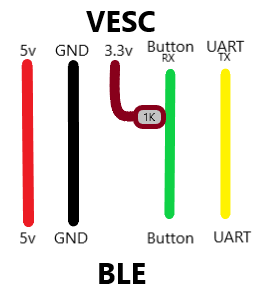
- One package for G30, M365/1S/PRO2 and Slave ESCs
- Settings in the UI
- Speed mode switch (Press twice)
- Secret speed mode (Hold throttle and brake and press twice)
- Lock mode with alarm, beeping and braking (Press twice while holding brake)
- Shutdown support (Long press to turn off)
- Motor start speed
- Idle display (battery, motor and controller temperature, voltage, trip or top speed)
- Temperature notification icon (configurable threshold)
- App communication (support third-party Xiaomi/NineBot apps)
- More secret profile button combinations (e.g. 3x press without brake)
- Cruise control (throttle gesture in secret mode)
- Idle timeout (shut down after X seconds of inactivity)
- Rear light and brake light output
- mph/km display toggle
- Overmodulation factor per mode
- Throttle/brake plausibility check (detect disconnected sensor)
- Use BMS SoC for battery display when available
- Wheelie Control (take vl_bike_39p and dash35b pkg as reference)
- Clone M365 PRO Dashboard (AliExpress)
- Original DE-Edition PRO 2 Dashboard
- Original DE-Edition G30 Dashboard
-
Spintend (Reliable & High Performance):
-
Makerbase:
-
75100 Alu PCB (Not recommended):
-
More recommended VESCs:
- MP2 300A 100V/150V VESC
- and many more - use whatever you like.
https://github.com/Koxx3/SmartESC_STM32_v2 (VESC firmware for Xiaomi ESCs)