- The factory pattern comes under the creational patterns list category.
- It provides one of the best ways to create an object.
- In factory pattern, objects are created without exposing the logic to client and referring to the newly created object using a common interface.
- Factory patterns are implemented in Python using factory method.
- When a user calls a method such that we pass in a string and the return value as a new object is implemented through factory method.
- The type of object used in factory method is determined by string (or identifier) which is passed through method.
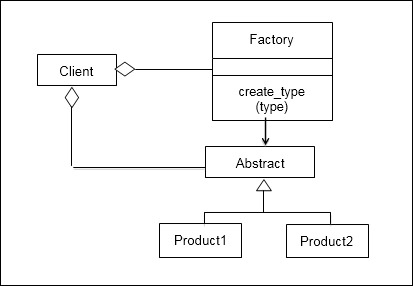
- To get the objects class, we can either use
__subclasses__() or globals()[className]
# factory.py

# A simple static factory method.
from __future__ import generators
import random

class Shape(object):
    # Create based on class name:
	@staticmethod
    def factory(type):
        #return eval(type + "()")
        if type == "Circle": return Circle()
        if type == "Square": return Square()
        assert 0, "Bad shape creation: " + type

class Circle(Shape):
    def draw(self): print("Circle.draw")
    def erase(self): print("Circle.erase")

class Square(Shape):
    def draw(self): print("Square.draw")
    def erase(self): print("Square.erase")

# Generate shape name strings:
def shapeNameGen(n):
    types = Shape.__subclasses__()
    for i in range(n):
        yield random.choice(types).__name__

shapes = \
  [ Shape.factory(i) for i in shapeNameGen(7)]

for shape in shapes:
    shape.draw()
    shape.erase()
# factory_2.py
class Button(object):
html = ""
def get_html(self):
return self.html
class Image(Button):
html = "<img></img>"
class Input(Button):
html = "<input></input>"
class Flash(Button):
html = "<obj></obj>"
class ButtonFactory():
def create_button(self, typ):
targetclass = typ.capitalize()
return globals()[targetclass]()
button_obj = ButtonFactory()
button = ['image', 'input', 'flash']
for b in button:
print button_obj.create_button(b).get_html()