ref: 文中有提到 stacking context 專有名詞,一些參考文
- 前端三十|04. [CSS] z-index 與 Stacking Context 的關係是什麼?
- https://developer.mozilla.org/zh-TW/docs/Web/CSS/CSS_Positioning/Understanding_z_index/Stacking_context_example_1
把所有的 z-index 歸為兩類 local or global
- 必須要包含在 new stacking context 中
- 很少需要
z-index大於1的
z-index的 value 應該要宣告成 global variables (in a central location)- 一個網站中,Global z-index 應該要少於 10 個
(文章的這段是給一個開發情境,說明調整 css 時,每次壞掉就去加一段 z-index 的開發情境)
- 作者有提供 demo,建議看完 or 邊看可以進去看一下 code,幫助理解
- https://codepen.io/davidgilbertson/pen/JrzxaV
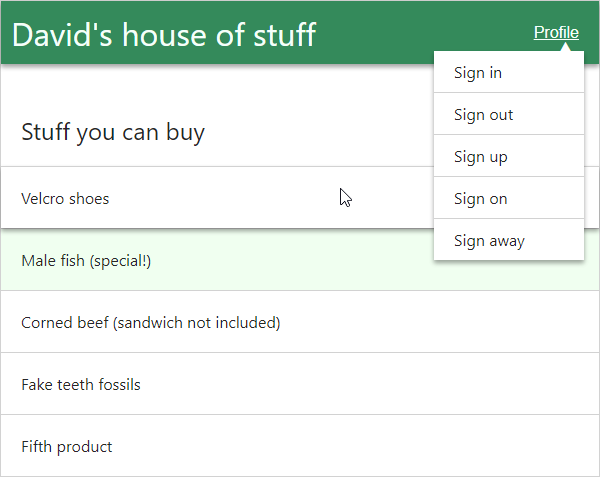

怎麼用最上面的規則,來思考解決這個問題(上面、右邊這張圖)?
先把有需要用到 z-index 歸類出來
- The full-screen modal is global
- The drop down menu is global
- The header could go either way, but I’ll say global
- The product list item is local
這邊談到所謂的 Global z-indexes,指的是把 z-index 設在 root stacking context 的 element 上面。(意思是這些 element 是位於 document 的最外層的 stacking context 中)
當考慮 global 時
- 考慮當「元件同時在畫面時」之間的堆疊關係(elements stack relative)
- 因為 relationship is important,所以 best practice 是,把所有的
z-index記錄在同一地方
(作者是使用 Sass variables)
$z-index-header: 1; // so that the shadow is above the body
$z-index-side-nav: 2; // when it slides out on mobile view
$z-index-chat-window: 3; // must be below the drop menu which overlaps on page X
$z-index-drop-down-menu: 4;
$z-index-full-screen-modal: 5;
不用 Sass or CSS variables 的話,就像一樣用 classes 吧
.z-index-header { z-index: 1 };
.z-index-side-nav { z-index: 2 };
.z-index-drop-down-menu { z-index: 3 };
.z-index-full-screen-modal { z-index: 4 };
你不需要太多的 global z-indexes,尤其是
- 當一次只允許一個 drop-down menu 出現時
- 當一次只允許一個 tool-tip 出現時
- 當一次只允許一個 full-screen modal 出現時
作者個人經驗,最多只用到 6 個,除非你寫的像 Google Sheets 這麼大的應用,你大概會有 20 個 global z-indexes
- value 從 1 開始依序往下上加就好, 1, 2, 3, 4 ...
- 有人對作者說,可以從十位數開始 10, 20 , 30, 40 ,然後有需要的話,中間可以穿插 35,作者對這種做法的回答是 "shrug and say ‘meh’"
- 100, 200, 300 這種完全是錯的用法,以為這樣更安全,但其實是你沒有搞懂 z-index 的用法,但你的 z-index 設定沒信心。
一個 document 有無數的 stacking contexts
- 這邊所指的 local 是指
z-index設定在位於new stacking context裡面的一個 element 上面 - 當一個 element 創造了一個
new stacking context,裡面所有的 child element 是沒辦法 render 到頁面上其他 element 之上的- 把這個想成
z-index有了 scoping
- 把這個想成
下面作者用上面的例子來講解
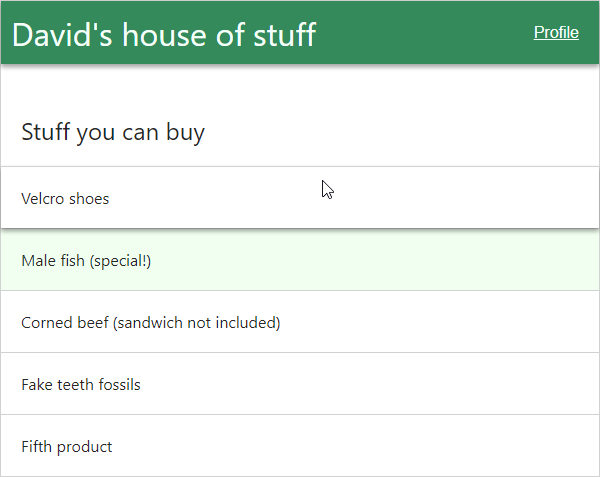
這圖中,product element 需要 z-index: 1 才能 hover 時讓 shadow rendered 在 sibling element 之上
DOM 結構是這樣
<ul class="product-list">
  <li class="product-list-item">Velcro shoes</li>
  <li class="product-list-item product-list-item--special">Male fish (special!)</li>
  <li class="product-list-item">Corned beef (sandwich not included)</li>
  <li class="product-list-item">Fake teeth fossils</li>
  <li class="product-list-item">Fifth product</li>
</ul>
這 case 中,hovered element 有可能需要 render 到 product list element 之外嗎?
- 沒有,所以這就當做是
local z-index,我們可以把它 scope 起來
專業點講法就是,把 .product-list element 建立一個 new stacking context
下面介紹三種方法,但基本上只需要知道第一種就好
CSS 2 spec 有定義
The root element forms the root stacking context. Other stacking contexts are generated by any positioned element (including relatively positioned elements) having a computed value of z-index other than auto. Stacking contexts are not necessarily related to containing blocks. In future levels of CSS, other properties may introduce stacking contexts, for example 'opacity' [CSS3COLOR].
所以 position: relative 和 z-index: 0 在一起,就會建立 new stacking context
(作者特別注解: If you want to be kind to future developers, don’t do this without an explanation of why you’re doing this. Perhaps a nicely-named mixin will be all the explanation you need.)
@mixin new-stacking-context {
  position: relative;
  z-index: 0;
}

.product-list {
  @include new-stacking-context;
}不喜歡上面那種 mixin,也有 one-liner 的方案
“any value other than
nonefor thetransformresults in the creation of a stacking context”.
所以 transform: translate(0) 也行,但 transform 這招是有 side effect,你要留意
像是設定裡面的 position: fixed,但沒效果
作者有弄個 DEMO
- https://codepen.io/davidgilbertson/pen/mBoYJZ
- 可以看到那個移動的 element 是
position: fixed,但外層其實有transform。所以裡面的 fixed 等於失效
上面那句 spec 的後半段描述
“any value other than none for the transform also causes the element to become … a containing block for fixed positioned descendants”.
所以如果用 transform: translate(0) 來建立 new stacking context
.product-list底下的 child 就永遠沒法 be fixed relative to the viewport
From the CSS Color spec
“implementations must create a new stacking context for any element with opacity less than 1”.
所以來個 opacity: 0.999 就會建立 new stacking context
- 有了
new stacking context之後,就能肯定 context 裡面所有的 element,都沒辦法 render 在 outside element 之上
最上面提到的 local 類別,通常都是用 z-index: 1
- 這並不是說「如果需要在正常DOM順序之外將其他內容疊加在一起 (if you need to layer a few things on top of each other outside of the normal DOM order)」是有問題的,只是作者說他從來沒有需要這樣用過(就靠 1 都能實現需求)。
當用到 3rd UI library ...
作者這邊一陣調侃,有些 UI library 沒有好好建立 new stacking context,還設 z-index: 100000 (某 jquery carousel lib)
導致某些 arrows 蓋過 full screen modals
正確的做法、這邊提到的 Sandbox,就是我們建立一個 new stacking context 來包
<style>
  .new-stacking-context {
    position: relative;
    z-index: 0;
  }
</style>

<div class="new-stacking-context">
  <!-- some dodgy third pary UI, will never render above anything outside of parent div -->
</div>