Multiple GameScene? Separate 2D and 3D in different SubScene? #1057

Replies: 6 comments

-
|
I tried this code but it doesn't work var obj =spawn("3DObject");
var subscene = new SubScene(obj.getViewComponent().getParent(), 1000,1000,true, SceneAntialiasing.BALANCED);
getGameScene().addChild(subscene);exception msg java.lang.IllegalArgumentException: Group@756d1abbis already inside a scene-graph and cannot be set as root seems like entity is already belonged to the default scene Thanks |
Beta Was this translation helpful? Give feedback.
-
|
If the scene layers are separated |
Beta Was this translation helpful? Give feedback.
-
|
Seems like fxgl-scene project has different types of scene |
Beta Was this translation helpful? Give feedback.
-
|
I found the source code here gameScene = GameScene(settings.width, settings.height,
GameWorld(),
PhysicsWorld(settings.height, settings.pixelsPerMeter, settings.collisionDetectionStrategy),
settings.is3D
)now there is only one game scene and we have to choose is3D or not |
Beta Was this translation helpful? Give feedback.
-
|
It could be implemented by insert a JavaFX SubScene class between root and contentRoot(both types are JavaFX Pane) of FXGL SubScene
|
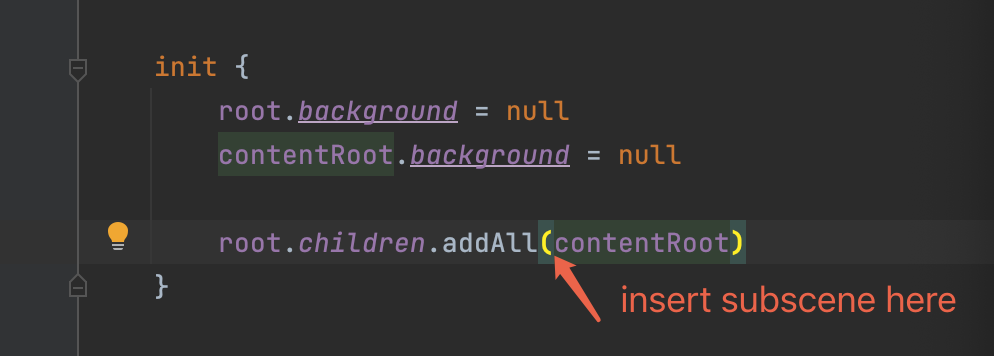
Beta Was this translation helpful? Give feedback.

-
|
There is an open issue related to supporting entities in multiple scene types, not just GameScene. After that is supported, it will be possible to properly consider multiple GameScene's, or perhaps a number of arbitrary scenes that allow mixing multiple (2d/3d) modes without changing the current game scene since FXGL thinks there is always just 1 instance. |
Beta Was this translation helpful? Give feedback.


Uh oh!
There was an error while loading. Please reload this page.
Uh oh!
There was an error while loading. Please reload this page.
-
Hi:
JavaFX provides a way of mix 2D and 3D object together using SubScene
https://openjfx.io/javadoc/16/javafx.graphics/javafx/scene/SubScene.html
so is it possible for FXGL to provide similar mechanism that we could have a sub scene of 3D objects and overlap with 2D scene layer?
thus we could mix 2D rendered objects and 3D objects in the same screen with different scenes
for now we could only choose the objects in the game are all 2D or 3D because they are all in the same scene
is it possible to build them and attach them in different scene layers
and then overlap these scenes layers and show them in the same screen?
like a back sub scene with all 3D objects and a front default scene with all 2D objects?
Thanks
Beta Was this translation helpful? Give feedback.
All reactions